CCM 1.4 Release Notes
Release date: June 2026
Continuous Control Monitoring 1.4 introduces Control Attestations. Until now a control's status came solely from its control tests: any failing test made the control fail, and a control with no tests had no status. There was no first-class, audited way to say "this control is satisfied by evidence that lives outside JupiterOne" - a vendor SOC 2 report, a risk acceptance, or a manual process - and have that reflected in your compliance posture.
Attestations close that gap. An authorised user can formally justify a control for a defined period; when no control test already covers it, the control is then reported as Attested - a pass, with a caveat - with the full justification retained for audit and automatic re-failure when the attestation expires. An attestation never overrides a failing test, so it can't mask a real gap.
What is new in CCM 1.4
| Feature | What it means for you |
|---|---|
| Control Attestations | Record external or compensating evidence against a control and have it count toward compliance for a bounded time |
| Attested status | A control passing solely by a valid attestation (no contributing test) reports as Pass, with an Attested note in the Effectiveness column - a pass with a caveat, never a hidden failure |
| Combined control view | Attestations and control tests now live in one Control tests and attestations section on the control page |
| Automatic expiry | When an attestation expires the control automatically re-fails, so a lapsed justification can never silently mask a gap |
| Compliance rollups & filters | Valid attested controls count as passing in scorecards, framework counts, and digests; you can filter the controls list by Attested |
| Expiry reminder emails | Attestation owners get a weekly email of attestations expiring soon or already expired, and the daily Control and OU digests now count the controls passing by attestation |
Control Attestations
An attestation is a record that justifies a control's compliance using evidence outside of its automated tests. Create one from the control detail page when you have control-edit permission.
Each attestation captures:
- Subject - a short title for the justification (e.g. "Vendor SOC 2 Type II report")
- Description - the supporting detail, in markdown
- Expiry date - when the justification lapses and the control re-evaluates
- Owner - the person responsible for renewing it
- Document link - an optional link to supporting evidence
Attestations are effective immediately - there is no approval workflow in this release. A control can carry more than one attestation (for example, one per vendor); the rules for how multiple attestations combine are described in How attestations affect control status below.
Attestations apply to live controls. The justification, edit, and revocation history is retained in the audit trail independently of the control, so revoking or expiring an attestation never erases the record of why it existed.
Attested status - a pass with a caveat
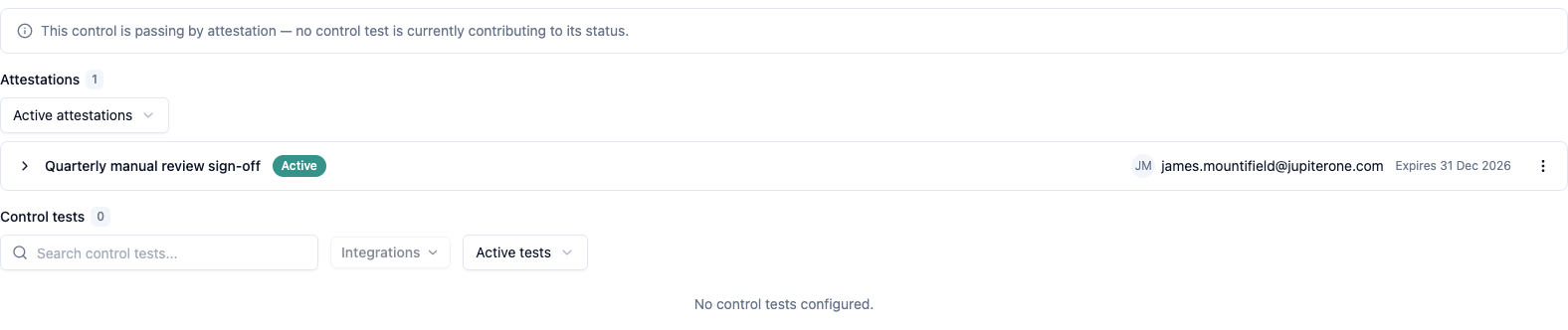
When a control passes solely by a valid attestation - it has no contributing control test - its status is reported as Pass, and the Effectiveness column shows an Attested note. The Attested marker makes clear the pass is backed by evidence rather than a passing test. A control that already passes on its tests stays a plain Pass; a control with a failing test still Fails - an attestation never masks it.
- Scorecards, framework compliance counts, and daily digests count valid attested controls as passing.
- The controls list still lets you find them: open More filters and filter by Attested to see exactly which controls are passing by attestation rather than by test.
- An expired attestation is not a pass - the control fails (see below).

Combined "Control tests and attestations" view
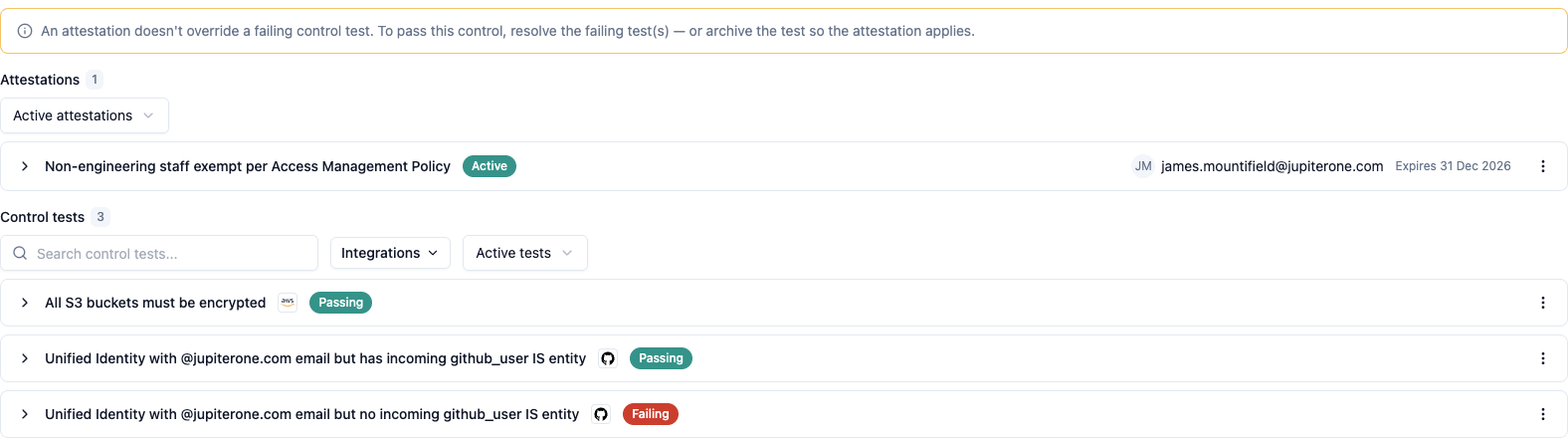
The control detail page now presents a single Control tests and attestations section. Attestations appear above the control tests. Because a failing test always fails the control - an attestation never masks it - the section calls out the two cases worth explaining: a control passing by attestation (a valid attestation with no contributing test), and a control failing despite an attestation (a failing test you still need to fix or archive).
This keeps everything about a control's compliance in one place: you can see the justification and the underlying test results together, and never have an attestation quietly hide a failing test.
How attestations affect control status
A control's status weighs its control tests and its attestations together - an attestation never overrides a failing test. Revoked attestations are removed and never count. The table below shows the resulting status for every combination:
| Control tests | Attestations | Control status |
|---|---|---|
| None contributing | None (or only revoked) | Not evaluated |
| None contributing | At least one valid attestation | Pass (Attested) |
| Passing | None or valid | Pass |
| Failing | Any (valid or not) | Fail |
| Any | Any non-revoked attestation expired | Fail |
The key rules:
- A failing control test always Fails the control - an attestation never masks it. To pass a control whose test is failing, fix the failing test, or archive the test if it no longer applies and let a valid attestation carry the control.
- Attested is reserved for a control that passes solely by a valid attestation, with no contributing test. A control that already passes on a test stays a plain Pass.
- If any non-revoked attestation has expired, the control Fails - even over passing tests. One lapsed justification fails the control, so an expiry is never overlooked.
- Revoking an attestation removes it from the calculation; the control reverts to whatever its tests (or remaining valid attestations) say.
Automatic expiry handling
Attestation expiry is a time event, so CCM re-evaluates attested controls on a recurring schedule (within 24 hours) in addition to recomputing immediately whenever an attestation is created, edited, or revoked. A control whose only attestation lapses returns to failing automatically - even if it has no control tests that would otherwise trigger a re-evaluation.
To renew an attestation before it lapses, open the control and Edit the attestation to extend its expiry date. Each attestation in the Control tests and attestations list shows its current state (active, expiring soon, expired, or revoked) so you can spot upcoming expiries.
Expiry reminder emails
Because a lapsed attestation re-fails its control, CCM reminds the people who can act on it - before and after an attestation lapses - rather than relying on them to check each control.
Weekly attestation digest. Each attestation owner receives a weekly email summarising the attestations they own that need attention:
- Already expired - attestations whose date has passed, so the control is failing now. These are listed first, as they need the most urgent action.
- Expiring soon - attestations due to expire within the next 30 days, so you can renew them before the control re-fails.
Each entry shows the attestation's subject, its expiry date, and a link to the control where you renew it. The email is sent only to owners who actually have something expiring or expired - if nothing needs attention, no email goes out - and revoked attestations are never included. The email also links to your Attested controls so you can review everything currently passing by attestation in one place.
Attestation coverage in the daily digests. The existing daily Control Owner and OU contact digests now also report how many of your controls are passing by attestation, so the attested portion of your posture is visible alongside the passing and failing counts.
Getting started
If you are an existing CCM user: Control Attestations are available immediately on your live controls.
- Open any live control from Compliance > Controls Status.
- In the Control tests and attestations section, choose Add an attestation.
- Enter the subject, description, expiry date, owner, and an optional document link, then save.
- The control's status updates to Pass with an Attested note; it will automatically re-fail if the attestation expires.
- On the controls list, open More filters and use the Attested filter to review everything currently passing by attestation.
If you are new to CCM: Start with the CCM 1.2 setup steps to create your frameworks, requirements, and controls, then layer attestations on top where automated tests cannot tell the whole story.
For full feature documentation, see Continuous Control Monitoring.