CCM 1.2 Release Notes
Release date: February 19, 2026
Continuous Control Monitoring 1.2 transforms CCM from a technical, JSON-import-driven tool into an accessible experience for your entire compliance team. With UI-based authoring, AI-assisted control creation, and enterprise governance workflows, you can now build and manage your control library without developer assistance or J1QL expertise.
What is new in CCM 1.2
| Feature | What it means for you |
|---|---|
| UI-based framework and requirement authoring | Create your compliance structure directly in the UI — no JSON imports required |
| AI-assisted control authoring | JupiterOne AI generates control descriptions, remediation steps, identifiers, and source catalogs from a title |
| AI-assisted control test creation | Describe what you want to test and JupiterOne AI writes the J1QL query for you |
| Control lifecycle management | Govern controls through Draft, Review, Live, and Retired states |
| Control effectiveness indicators | See at a glance whether controls have datapoints, are passing, or need attention |
| Integration awareness | Know which integrations your control tests depend on before you save |
| Control properties and ownership | Assign owners, define remediation steps, and track exception processes per control |
| Entitlement management | Transparent usage metering based on your Live control count |
Create frameworks and requirements in the UI
Previously, creating a custom compliance framework required importing a JSON file. Now you can build your entire compliance structure directly in the JupiterOne UI.
You can:
- Create new frameworks with a title and description using the markdown editor
- Add requirements within a framework, each with an identifier, priority, and description
- Edit existing frameworks and requirements inline
- Delete frameworks and requirements with soft-delete protection
This means compliance managers can define and maintain custom frameworks without developer help or file preparation.
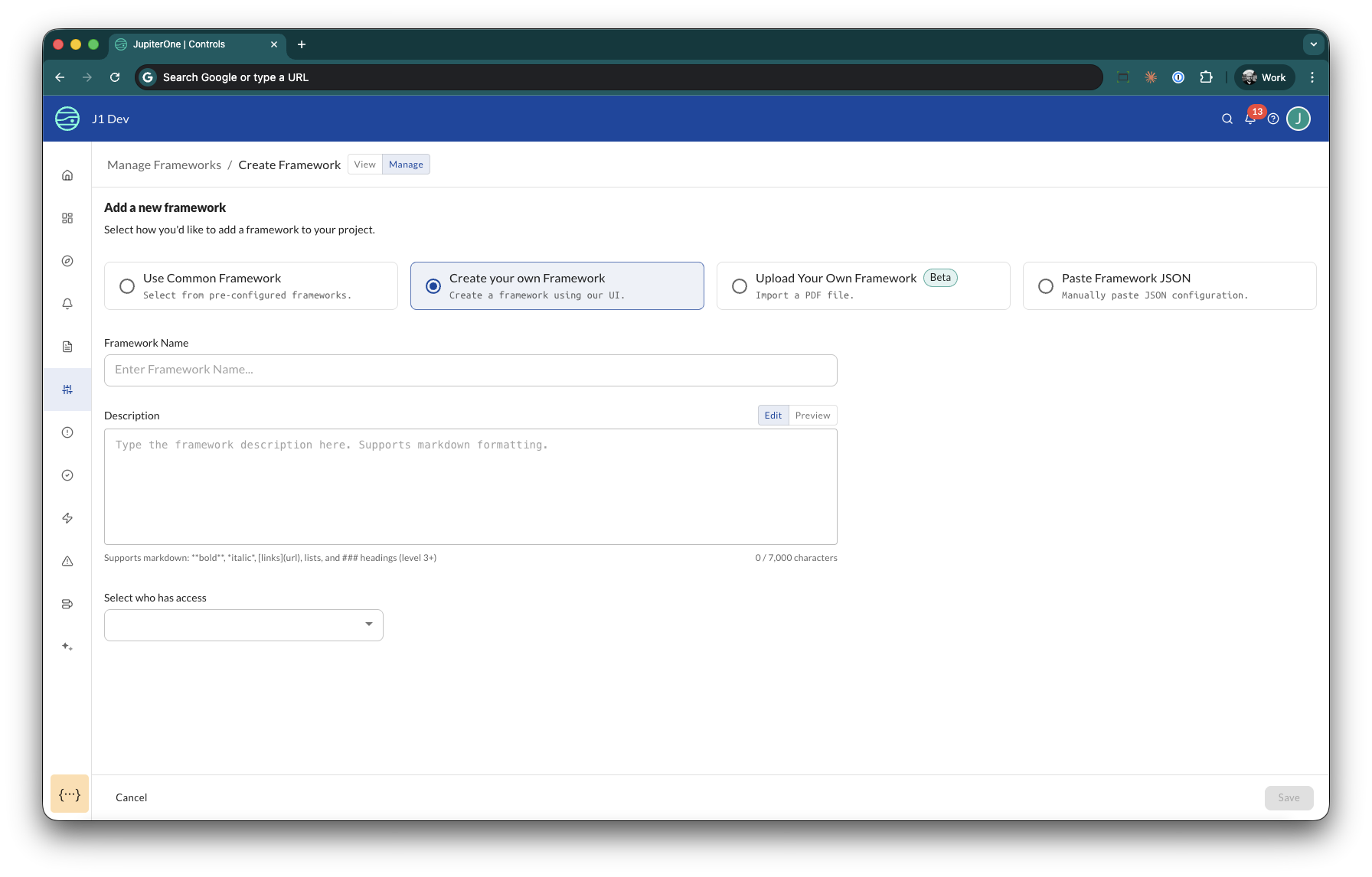
You can still use the Use Common Framework option to start from an out-of-the-box CIS benchmark (including AWS, Azure, GCP, Microsoft 365, GitHub, Oracle Cloud Infrastructure, and Kubernetes), then customize it with your own requirements. If you need a framework that is not listed, click Request a new Framework to submit a request.
Author controls with AI assistance
JupiterOne AI dramatically reduces the time it takes to author a new control. Instead of writing every field from scratch, you enter a control title and JupiterOne AI generates the rest.
How it works:
- Navigate to a requirement and click Add a control
- Enter a descriptive title (for example, "S3 Bucket Encryption Control")
- Click Draft control with AI — JupiterOne AI auto-generates:
- Control description
- Remediation steps
- Identifier
- Source catalog
- Review and edit any field — AI suggestions are not mandatory
JupiterOne AI uses context from the linked requirement to improve suggestion quality. You maintain full control over the final content.
AI-assisted generation is available when creating a new control. When editing an existing control, you update fields manually.
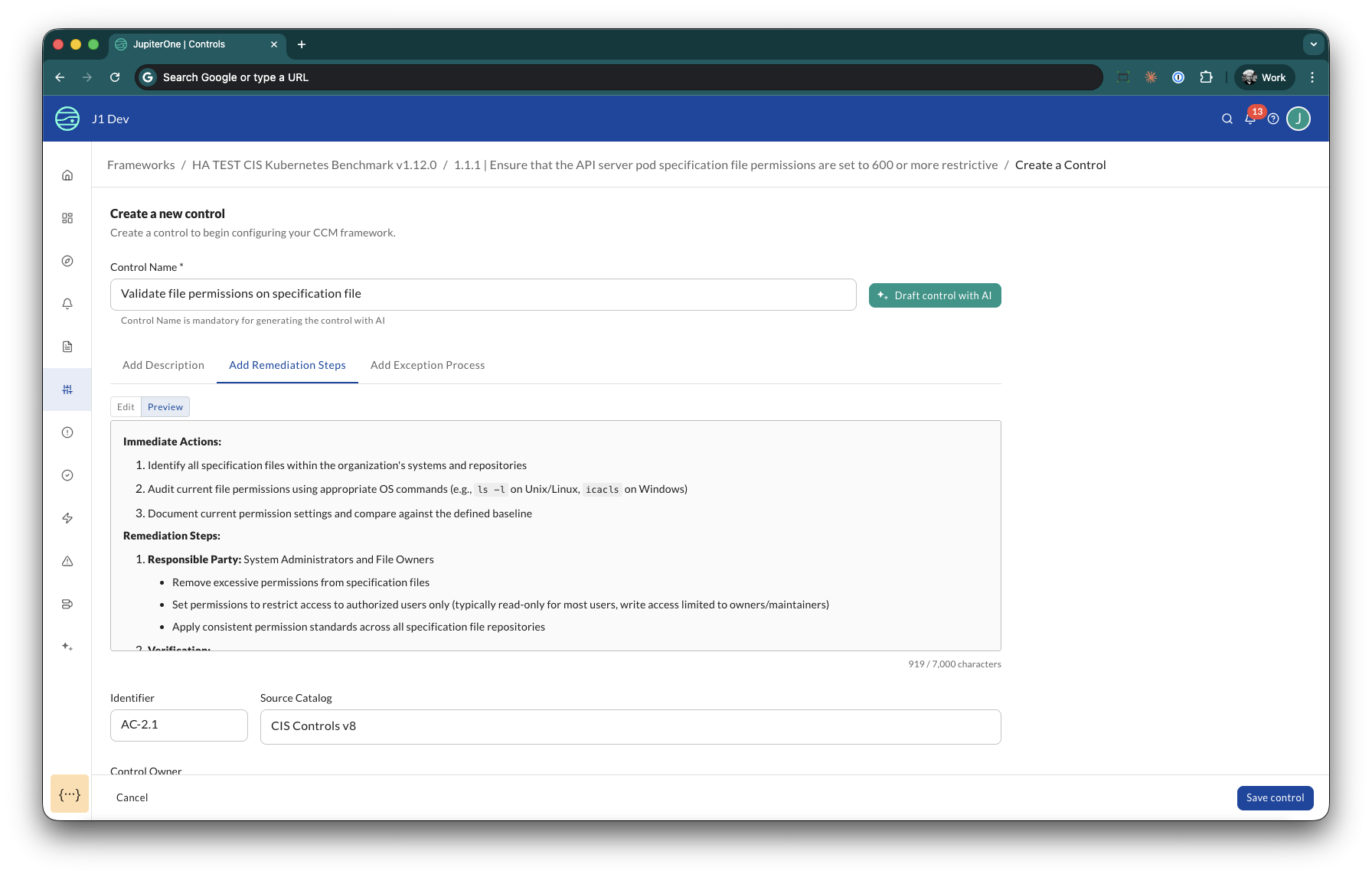
JupiterOne AI is trained on CIS Controls v8.0, so it generates consistent, industry-standard language. You can always edit the output to match your organization's terminology.
Create control tests with AI-generated queries
You no longer need J1QL expertise to create control tests. Describe what you want to validate and JupiterOne AI writes the query for you.
AI-assisted query generation is available when creating a new control test. When editing an existing test, you update the query manually.
How it works:
- From a control, click New control test
- Enter a descriptive title (for example, "S3 buckets without encryption enabled")
- Select the test type: Compliant assets or Non-compliant assets
- Click Generate query — JupiterOne AI generates the J1QL query based on your title and the control context, and automatically runs it so you can review matching entities
- Save the test
Mirror test creation: After you save a Non-compliant assets test, CCM prompts you to add a corresponding Compliant assets test (and vice versa) with the test type pre-selected. This ensures comprehensive coverage with minimal effort.
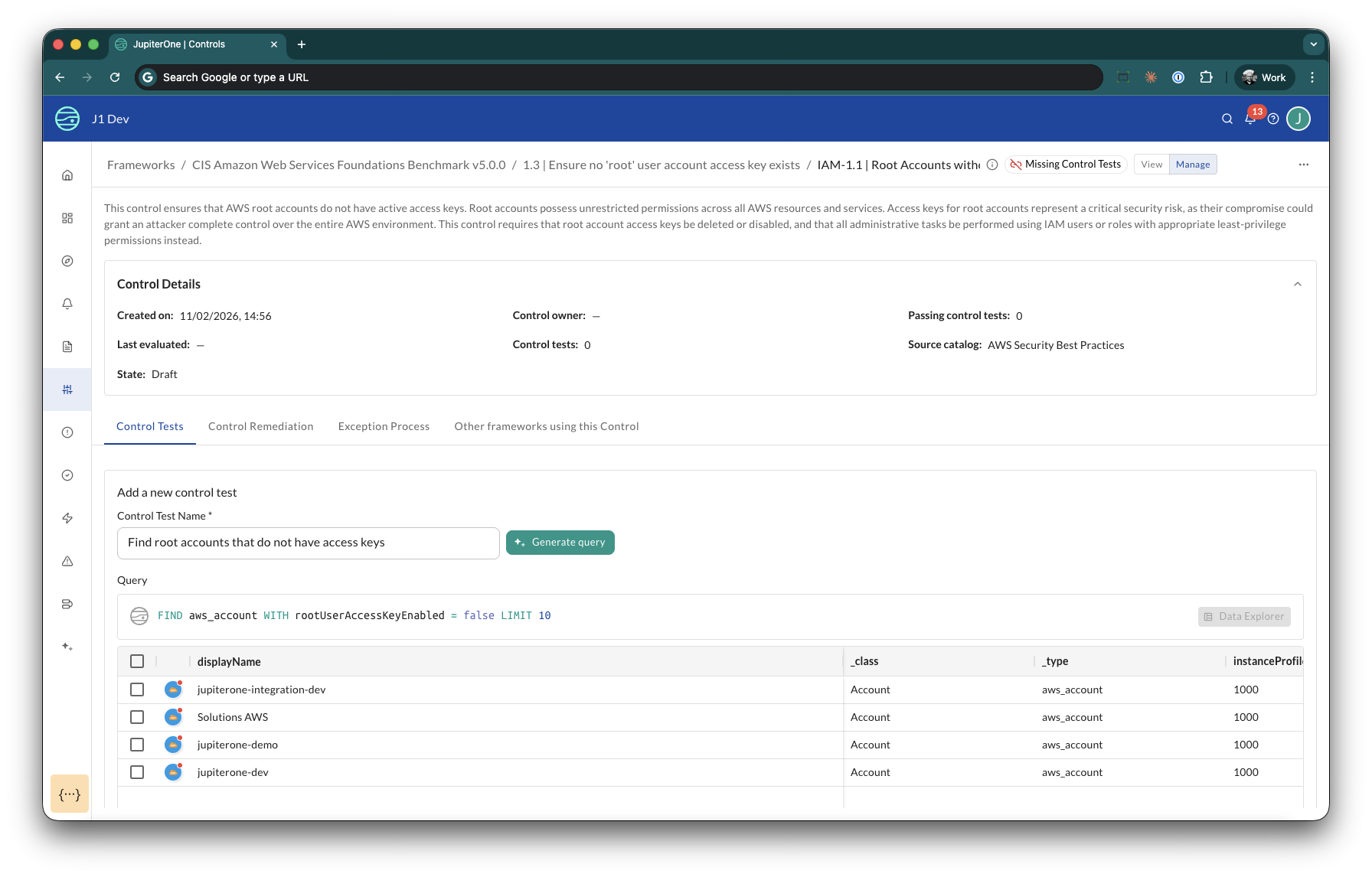
Always review the query results before saving. The results grid shows you exactly which entities match, so you can verify the query logic is correct. Click Run J1QL to re-run the query if you make manual edits.
Control lifecycle management
CCM 1.2 introduces enterprise-grade governance for your control library. Every control now moves through a defined lifecycle, preventing untested or unapproved controls from affecting your compliance posture.
Lifecycle states:
| State | Purpose |
|---|---|
| Draft | Control is being developed. This is the default state for new controls. |
| Review | Control is ready for validation by your team. |
| Live | Control is active and affects compliance scoring. |
| Retired | Control is no longer active but preserved for audit history. |
Key behaviors:
- Only Live controls are evaluated during compliance scoring
- Every state transition is recorded in an audit trail with optional notes
- You can filter your control library by lifecycle state (under More filters > State)
- Only Live controls count toward your entitlement limits
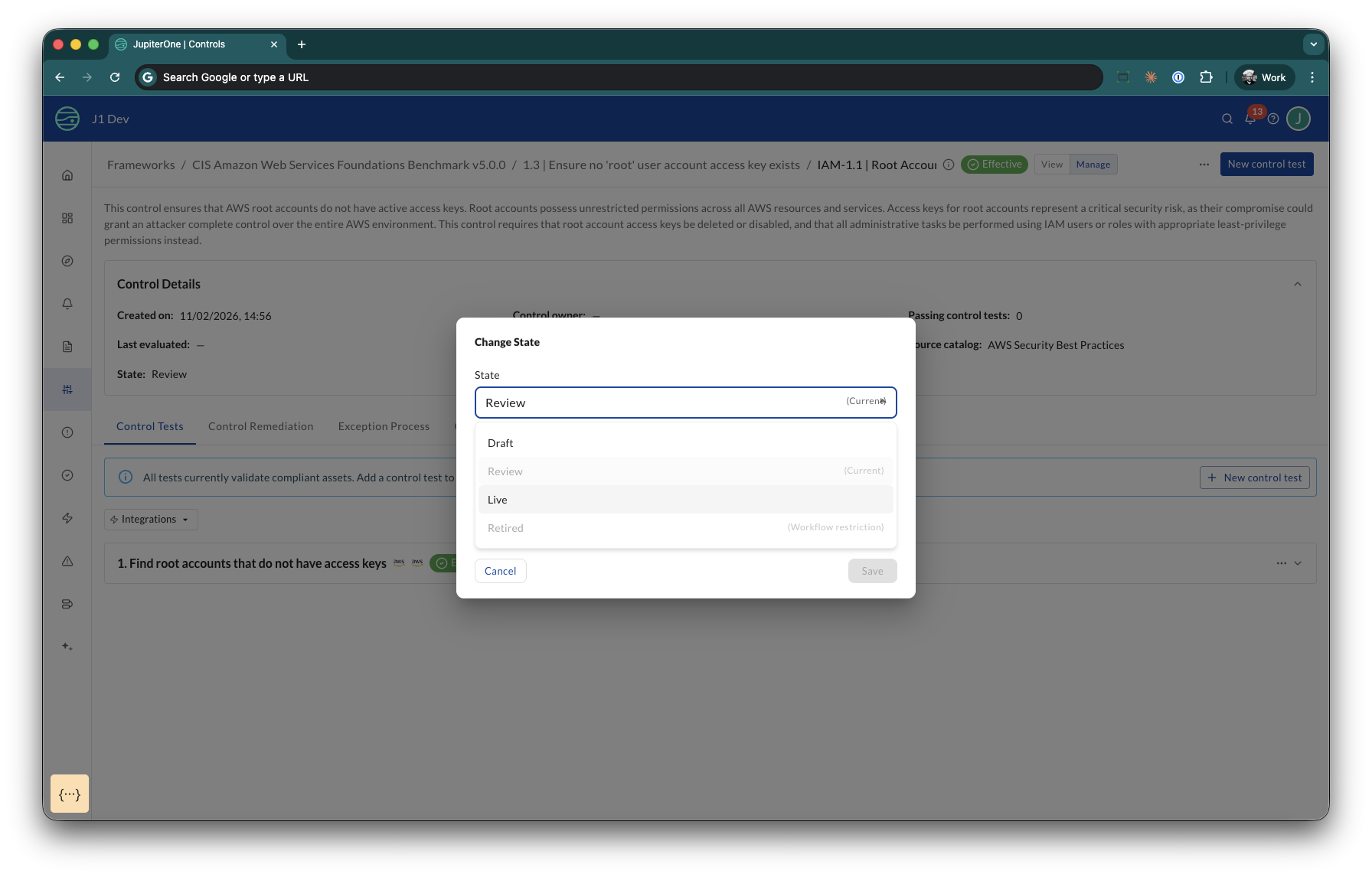
Use the Review state as a quality gate. Controls in Review are visible to your team for validation but do not affect your compliance scores or entitlement usage.
Control effectiveness at a glance
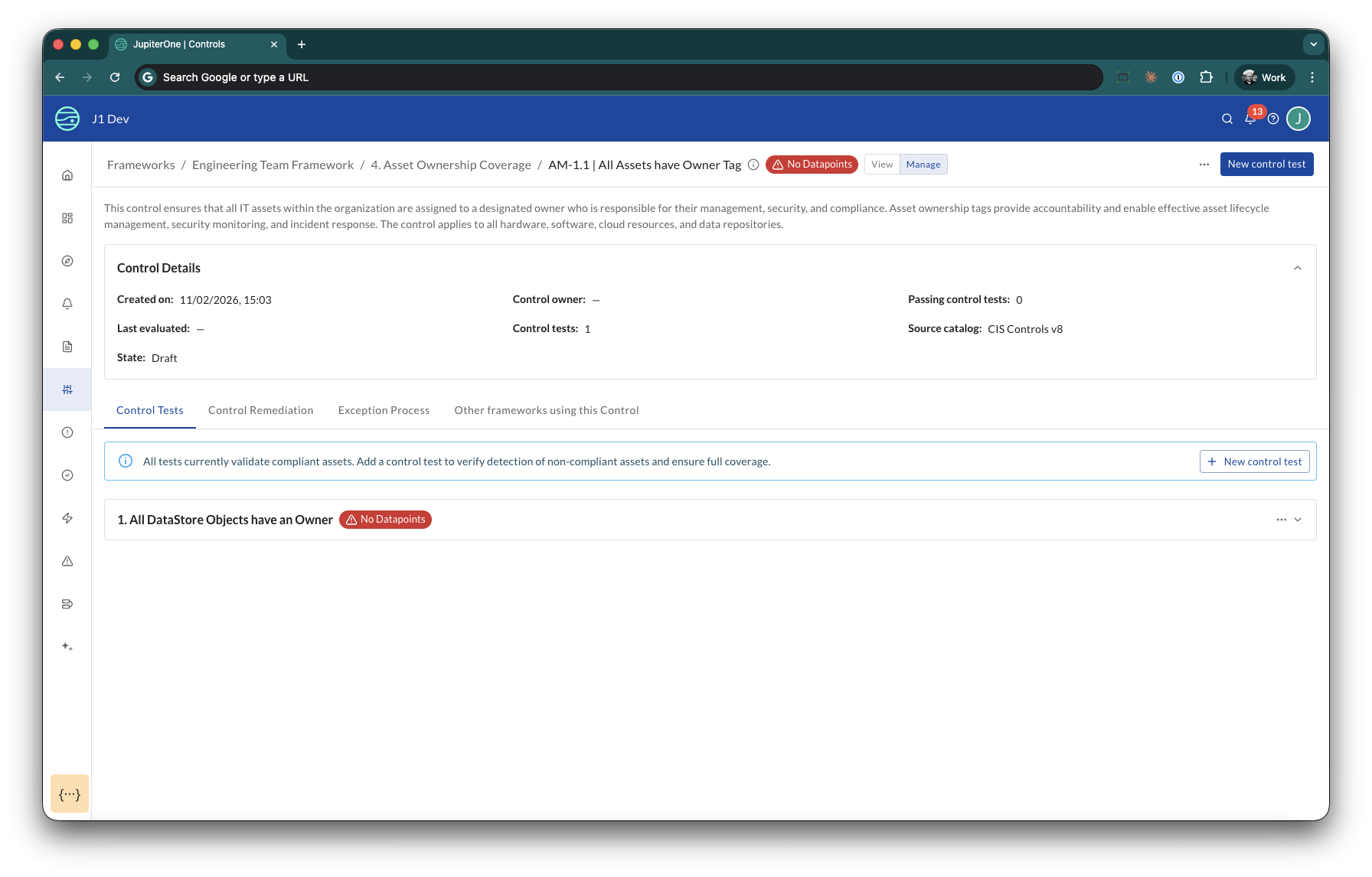
CCM 1.2 adds clear status indicators so you can instantly understand whether your controls are working.
Control test statuses:
- No Datapoints — The test query returned no matching entities, preventing false failures when data is unavailable.
- Control tests that are effective (passing) are not decorated with a special status.
Control statuses:
- No Control Tests — The control has no tests configured.
- No Datapoints — All of the control's tests lack datapoints.
- Controls with at least one passing test that has datapoints show standard pass/fail results.
Status rolls up from the test level to the control level, and from the control level to the requirement level. You can see at every layer of your compliance hierarchy where attention is needed.
Integration awareness
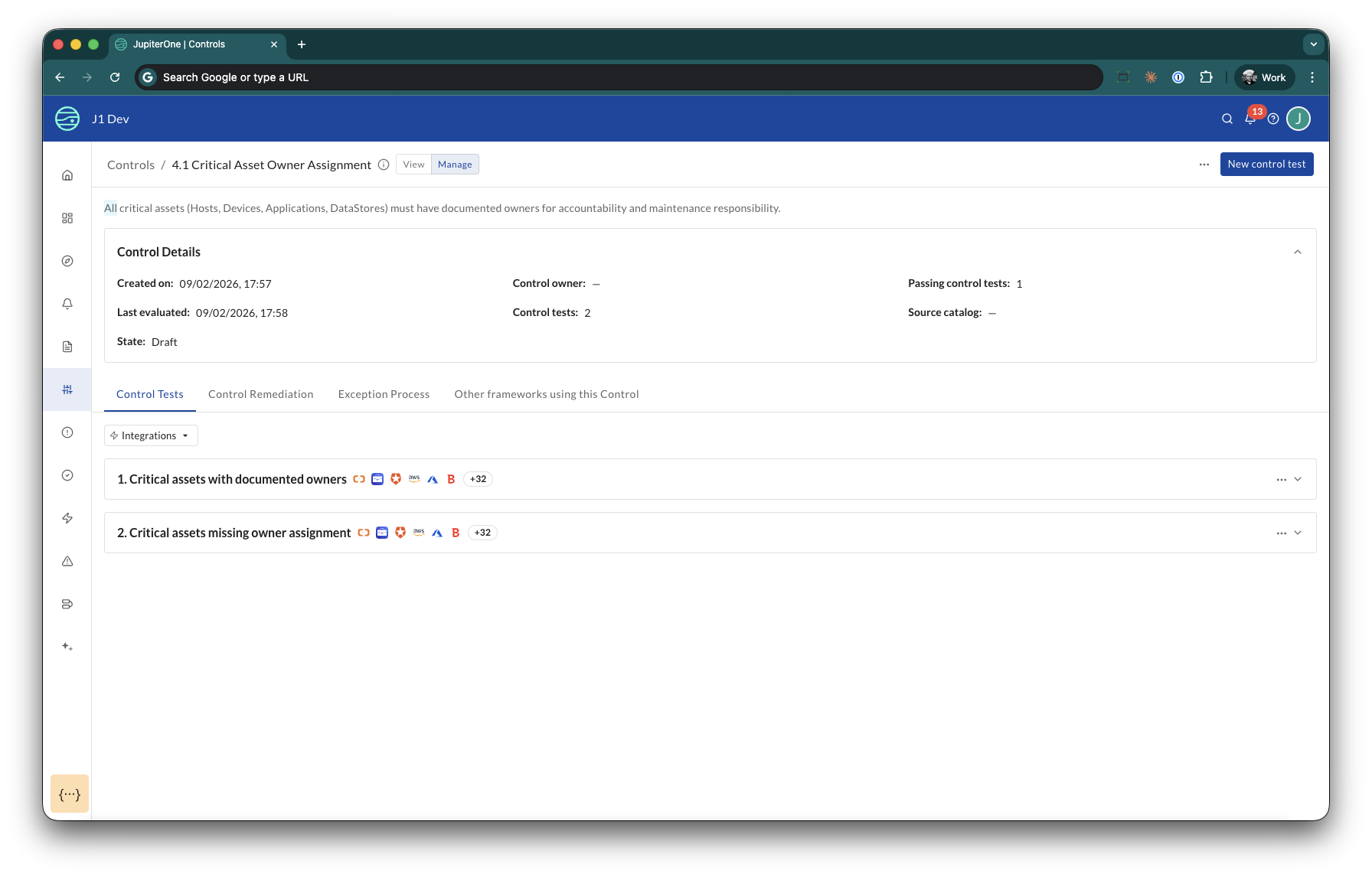
CCM 1.2 automatically detects which integrations a control test queries and gives you real-time feedback on eligibility.
How it works:
- When you author a control test, the UI shows which integrations provide data for your query
- If no matching entities exist for a test (for example, you have no AWS integrations but the test queries
aws_s3_bucket), the test shows No Datapoints - Tests with no datapoints are skipped during evaluation — they do not produce false failures
This prevents the common "why is my control failing?" confusion that occurs when a test queries data from an integration you have not configured.
New control properties
Controls in CCM 1.2 include richer properties that support accountability and operational workflows:
- Title — Clear, descriptive name for the control
- Identifier — Reference code for sorting and filtering (for example, "IAM-001")
- Catalog — Logical grouping for the control (for example, "CIS Controls v8"). Select an existing catalog or create a new one.
- Description — What the control validates and why (AI-assisted on create)
- Remediation — Steps to take when the control is failing (AI-assisted on create)
- Exception Process — How to handle approved exceptions for this control
- Owner — The JupiterOne user responsible for this control
Assigning a Control Owner enables accountability and allows you to filter your control library and see who is responsible for a given control.
Entitlement management
CCM 1.2 provides transparent usage metering so you always know where you stand relative to your entitlement.
- Usage is based on your Live control count
- Controls in Draft, Review, or Retired states are excluded from your limit
This means you can freely develop and stage controls without worrying about exceeding your entitlement until you move them to Live.
Getting started
If you are an existing CCM user: Your existing controls are automatically set to Live status. No migration action is required. You can begin using lifecycle management, AI authoring, and the new UI features immediately.
If you are new to CCM: Follow these steps to get started:
- Navigate to Controls > Frameworks and click Add a framework to create your first framework (or choose an out-of-the-box CIS benchmark)
- Add requirements to your framework
- Create controls within your requirements — use JupiterOne AI to accelerate authoring
- Add control tests to validate each control — let JupiterOne AI generate the J1QL queries
- Move controls through the lifecycle: Draft → Review → Live
- Monitor effectiveness from the framework and requirement views
For full feature documentation, see Continuous Control Monitoring.