AI Attack Surface Management
JupiterOne AI Attack Surface Management (AI-ASM) gives security and governance teams a single view of the non-human identities (NHIs) in their environment, automatically flags the ones that are AI-related, and shows what each identity can reach across your connected systems.
As teams adopt AI assistants, agents, and platform services, the number of machine identities — service accounts, API keys, OAuth apps, bots, and roles — grows far faster than the human identities security teams traditionally track. AI-ASM brings these identities into the JupiterOne graph, classifies which ones are AI-powered, and governs them against the same control framework model used by Continuous Control Monitoring.
Overview
AI Attack Surface Management enables your team to:
- Discover every non-human identity across your integrated cloud platforms, SaaS tools, and source control, without manual inventory work
- Identify AI identities automatically using detection heuristics that flag NHIs associated with AI agents, models, and AI-powered workloads
- See what each identity can reach — the data stores, repositories, databases, packages, vaults, tables, and disks an identity has access to
- Prioritise by risk so the identities with the broadest reach and the most failing controls surface first
- Govern AI usage against an out-of-the-box NHI governance framework mapped to standards such as NIST AI RMF, the EU AI Act, NIS2, and DORA
- Find shadow AI — AI-powered identities provisioned outside approved channels
Data model
AI-ASM is built on the non-human identity (NHI) — any digital identity that is not a person, such as a service account, machine credential, secret, OAuth app, bot, certificate, API key, webhook, or CI/CD identity. NHIs are discovered through your existing JupiterOne integrations and stored as entities in the graph, so they participate in queries, controls, and relationships like any other asset.
Each NHI carries a set of properties that AI-ASM uses to classify and govern it:
| Property | Description |
|---|---|
nhiType | The category of identity — for example service_account, secret, oauth_app, bot, service_role, service_linked_role, or credential |
isAi | Whether the identity is associated with an AI agent, model, or AI-powered workload |
aiConfidence | How strong the evidence is that the identity is AI-related: confirmed, high, medium, or low. See Confidence ratings |
aiDetectionMethod | The detection rule that classified the identity as AI-related, for example inherent_resource or api_key_name. See Detection methods |
aiPlatform | The AI platform or vendor the identity belongs to — for example Anthropic, OpenAI, AWS Bedrock, or AWS SageMaker |
owner | The human or team accountable for the identity |
nhiOwnerStatus | Ownership state used by governance triage: assigned, unassigned, or orphaned |
Because NHIs are first-class graph entities, you can query them directly in J1QL:
FIND NHI WITH isAi = true AND aiConfidence = ('confirmed' OR 'high')
aiConfidence is a string value (confirmed, high, medium, or low), not a number. Compare it against those literal values rather than a numeric threshold.
How AI-ASM detects AI identities
AI-ASM checks every discovered NHI against a catalog of known AI platforms and records the result on the identity. Each AI identity shows a confidence rating and the detection method that matched, so you can see why it was classified as AI-related.
Detection is deterministic and based on the identity itself. AI-ASM compares the identity's entity type and identifying properties (its name, display name, email, OAuth client ID, or GitHub App slug) against the patterns for each platform. It does not read the values of secrets or keys, and it does not use an AI model to judge individual identities.
Detection runs in the background after your integrations sync. A newly discovered identity might take some time to show AI detection results.
Identities are also grouped into a category that describes the kind of AI usage: Foundation (model and inference providers), Code assistant, AI SaaS, or Agent framework.
Confidence ratings
The confidence rating tells you how strong the evidence is that an identity is AI-related. It is stored on the identity as aiConfidence, and it appears in the AI detection column of the inventory, in the Top risk AI identities table, and in the identity detail panel.
| Rating | What it means | Detection methods | Examples |
|---|---|---|---|
| Confirmed | An exact match proves the identity belongs to an AI platform. Either the entity type is inherently an AI resource, or an exact identifier matches a known AI application. No name interpretation is involved. | inherent_resource, oauth_client_id, github_app_slug | An aws_bedrock_agent, aws_sagemaker_endpoint, or azure_machine_learning_workspace entity. A GitHub App installed with the slug copilot or coderabbitai. |
| High | The identity follows a naming convention specific to an AI provider. Secret and key names, and service account names and emails, are usually set on purpose, so they are a strong signal. | api_key_name, service_account_pattern | A repository secret named OPENAI_API_KEY or ANTHROPIC_API_KEY. A Google Cloud service account whose email contains -aiplatform@. An AWS IAM role named AmazonSageMaker-ExecutionRole-…. |
| Medium | The identity's display name, Slack bot name, or cloud resource name mentions an AI product. Names are free text, so they are a useful signal but can produce false positives. | display_name_pattern, slack_bot_name, cloud_resource_pattern | An Okta application labelled ChatGPT Enterprise. A Slack bot named Claude. A Google Cloud API service named aiplatform.googleapis.com. |
| Low | Weak or indirect evidence. Treat it as a lead to investigate, not a classification to rely on. | Supplementary rules only (see below) | The built-in catalog does not assign Low. You see it only when a supplementary detection rule rates its own evidence as weak. |
AI-ASM evaluates the detection methods from strongest to weakest and stops at the first match. An identity's rating therefore always reflects the strongest evidence available. For example, a secret named OPENAI_API_KEY is rated High through api_key_name, even though its name would also match a weaker pattern.
The confidence rating is not a risk score. It says nothing about what the identity can access or how likely it is to be misused. To prioritise by risk, use data reach and failing controls, as shown in the Top risk AI identities table.
An identity that matches no detection rule has no isAi or aiConfidence value. A missing rating means AI-ASM found no evidence. It does not prove the identity is not AI-related, for example a key for an AI provider that is not yet in the catalog, or a secret with a generic name such as API_KEY.
Detection methods
The detection method shows which rule matched. It is stored as aiDetectionMethod and is shown next to the confidence rating in the AI detection column.
| Method | Rating | What matched |
|---|---|---|
inherent_resource | Confirmed | The entity type is always AI-related, such as an AWS Bedrock agent, AWS SageMaker model or endpoint, Google Vertex AI model, or Azure Machine Learning workspace |
oauth_client_id | Confirmed | The OAuth client ID or application ID of an Azure service principal, Okta application, or Auth0 client exactly matches a known AI application |
github_app_slug | Confirmed | The slug of an installed GitHub App exactly matches a known AI application, such as GitHub Copilot or CodeRabbit |
api_key_name | High | The name of a secret, access key, access token, or API key matches a provider's key naming convention, such as OPENAI_API_KEY, ANTHROPIC_API_KEY, or AZURE_OPENAI_API_KEY |
service_account_pattern | High | The name or email of a service account or role matches a provider's naming convention, such as AmazonBedrock…, AmazonSageMaker…, or …-aiplatform@… |
display_name_pattern | Medium | The display name or label of an application or service principal mentions an AI product, such as OpenAI, ChatGPT, or Claude |
slack_bot_name | Medium | The name of a Slack bot mentions an AI assistant, such as ChatGPT or Claude |
cloud_resource_pattern | Medium | The name of a cloud resource, such as a Google Cloud API service, mentions an AI service |
Supplementary detection rules
The built-in catalog is checked first. When an identity matches nothing in the catalog, AI-ASM also checks supplementary detection rules. JupiterOne reviews and approves these rules before they are used, and they cover AI platforms and naming conventions that are not yet in the catalog. Each rule applies only to the entity types it was written for, and it sets its own rating on the same Confirmed, High, Medium, Low scale.
Identities matched by a supplementary rule can show these additional detection methods: oauth_app, github_app, inherent_identity, api_key_pattern, slack_app, service_account_pattern, display_name_pattern, and cloud_resource_pattern.
Using confidence ratings
Choose how much to rely on a rating based on what you need it for:
- Confirmed and High: treat these as AI identities for governance, reporting, and control scope. False positives are rare.
- Medium: check before you act on them. Open the identity to confirm that the name reflects real AI usage, such as an application that is actually an AI assistant, and not an unrelated resource that only mentions an AI product.
- Low: treat these as leads for investigation.
To focus the inventory, use the detection confidence filter in AI-ASM > Inventory. You can query the same groupings in J1QL:
FIND NHI WITH isAi = true AND aiConfidence = ('confirmed' OR 'high')
FIND NHI WITH isAi = true AND aiConfidence = 'medium'
  AS n RETURN n.displayName, n._type, n.aiPlatformName, n.aiDetectionMethod
The AI-ASM dashboard
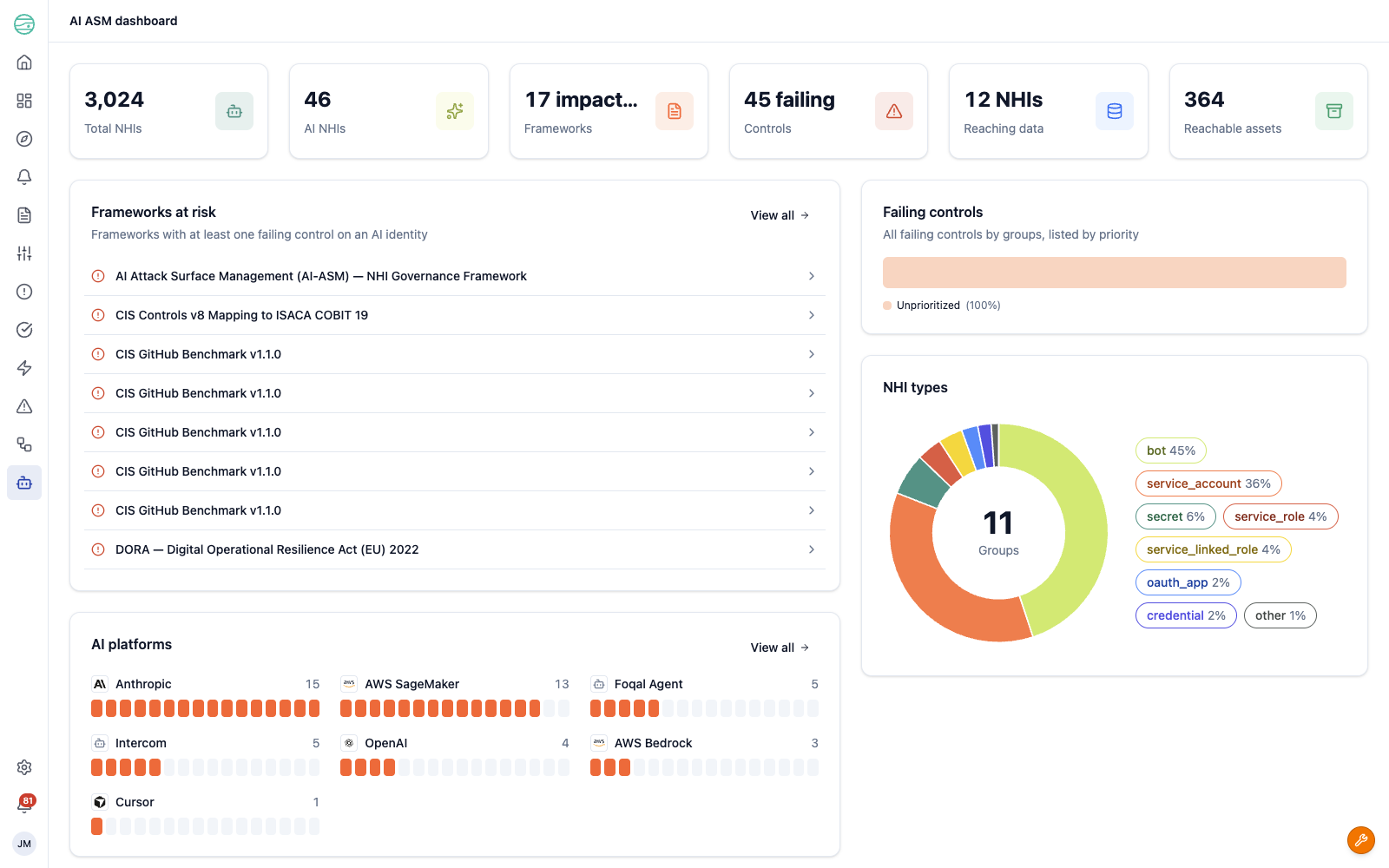
The Dashboard is the landing view for AI-ASM. It summarises your AI attack surface and highlights where attention is needed.
Summary metrics across the top show:
- Total NHIs — every non-human identity discovered in your environment
- AI NHIs — the subset classified as AI-related
- Frameworks — the number of frameworks with at least one failing control on an AI identity
- Controls — the number of failing controls
- Reaching data — the number of AI identities that can reach data
- Reachable assets — the total number of assets those identities can reach
Below the metrics, the dashboard breaks the surface down into focused panels:
- Frameworks at risk — frameworks with at least one failing control on an AI identity, so you can see which compliance obligations your AI usage affects
- Failing controls — failing controls grouped and ordered by priority
- AI platforms — a breakdown of AI identities by platform (for example Anthropic, AWS SageMaker, Foqal Agent, Intercom, OpenAI, AWS Bedrock, and Cursor)
- NHI types — the distribution of identities across NHI categories such as bot, service account, secret, and the various role types
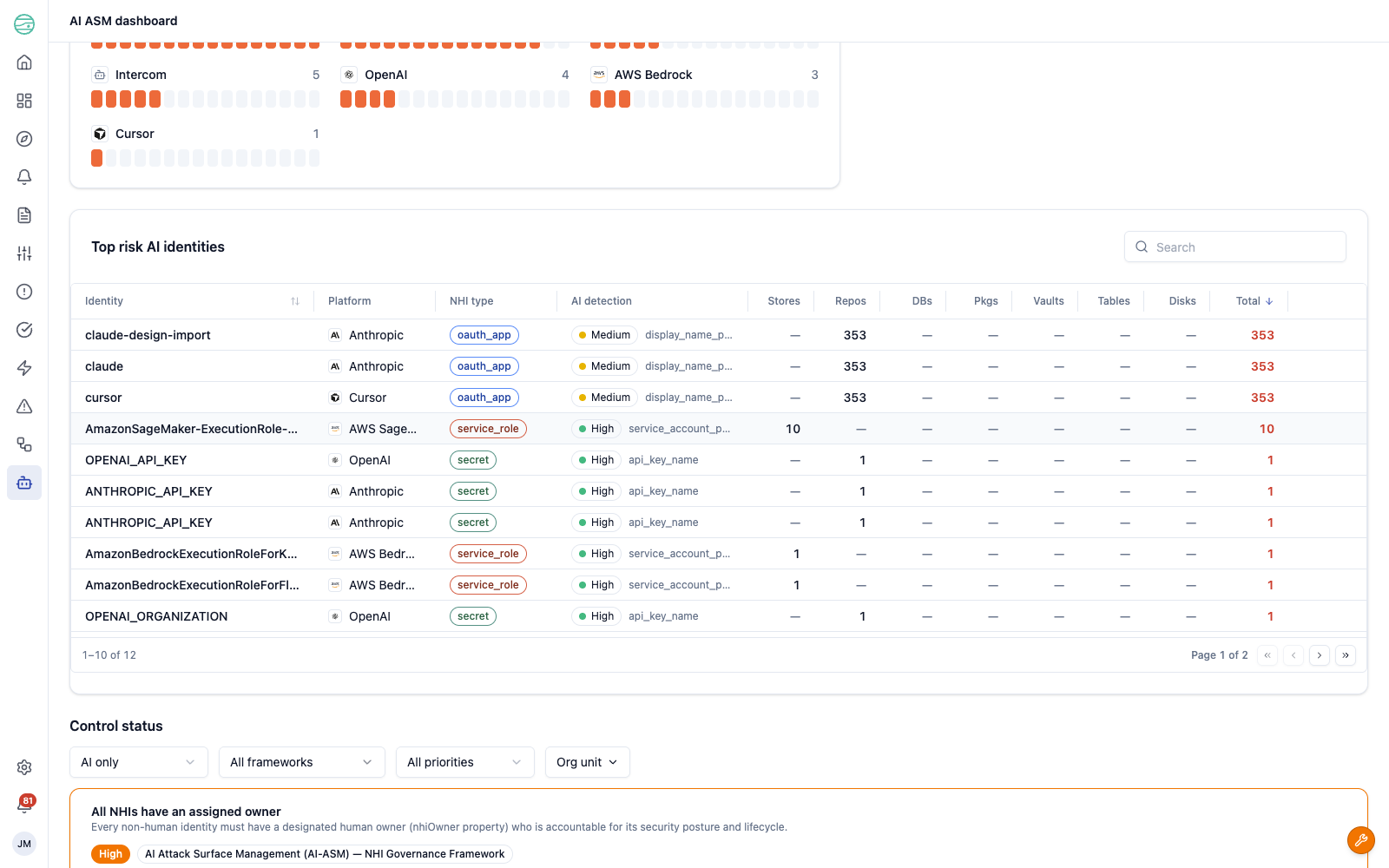
Top risk AI identities
The dashboard ranks AI identities by risk in the Top risk AI identities table. Each row shows the identity, its platform, NHI type, and AI detection confidence and method, followed by a breakdown of what the identity can reach — Stores, Repos, DBs, Pkgs, Vaults, Tables, and Disks — and a Total reach count. Identities with the broadest reach surface at the top, so you can focus on the identities that would cause the most damage if compromised.
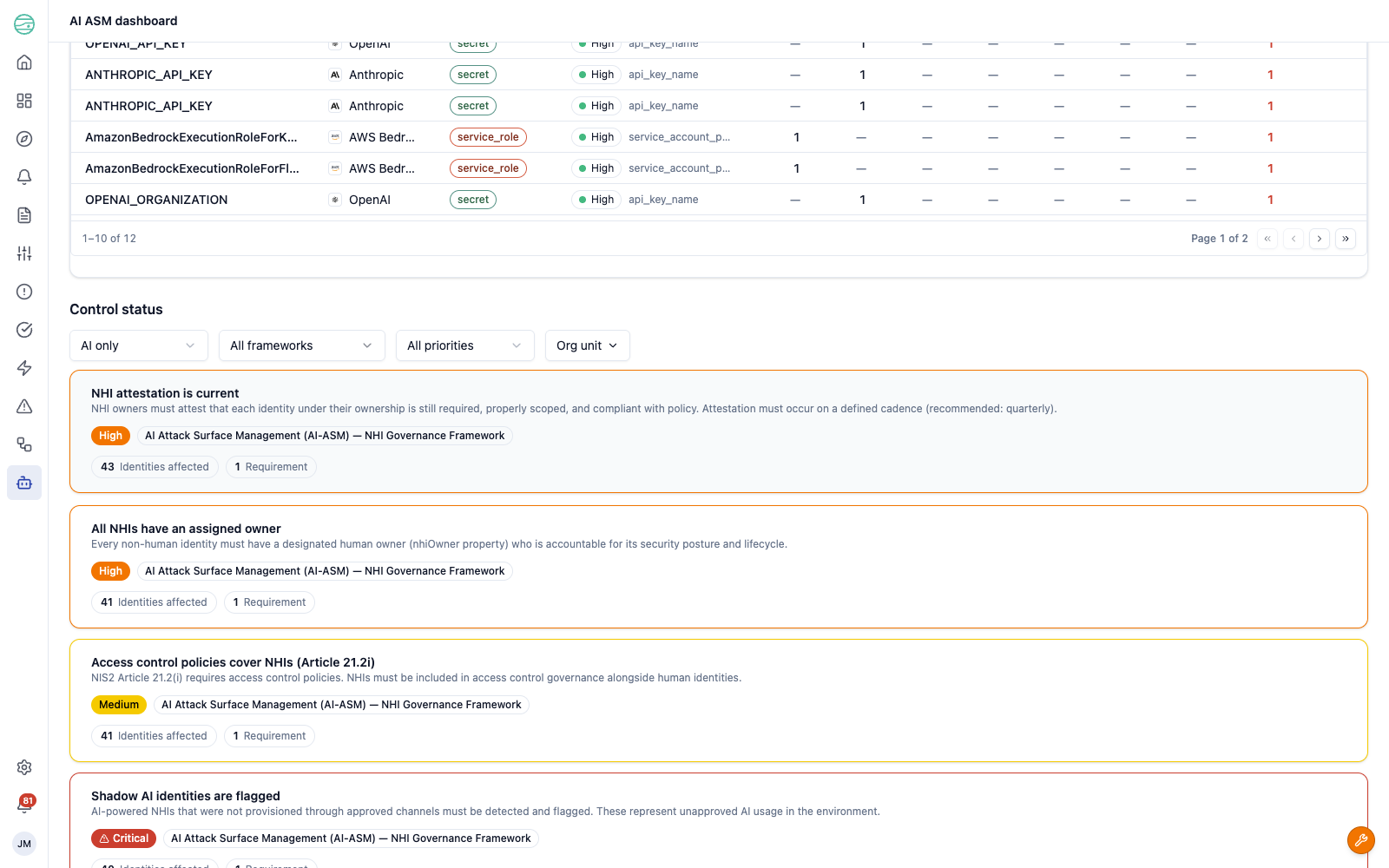
Control status
The Control status section at the bottom of the dashboard shows the controls that govern your AI identities. Filter by AI only, framework, priority, or organisational unit to focus the view. Each control card shows the control name and description, its priority, the framework it belongs to, the number of identities affected, and the number of requirements it maps to.
The AI inventory
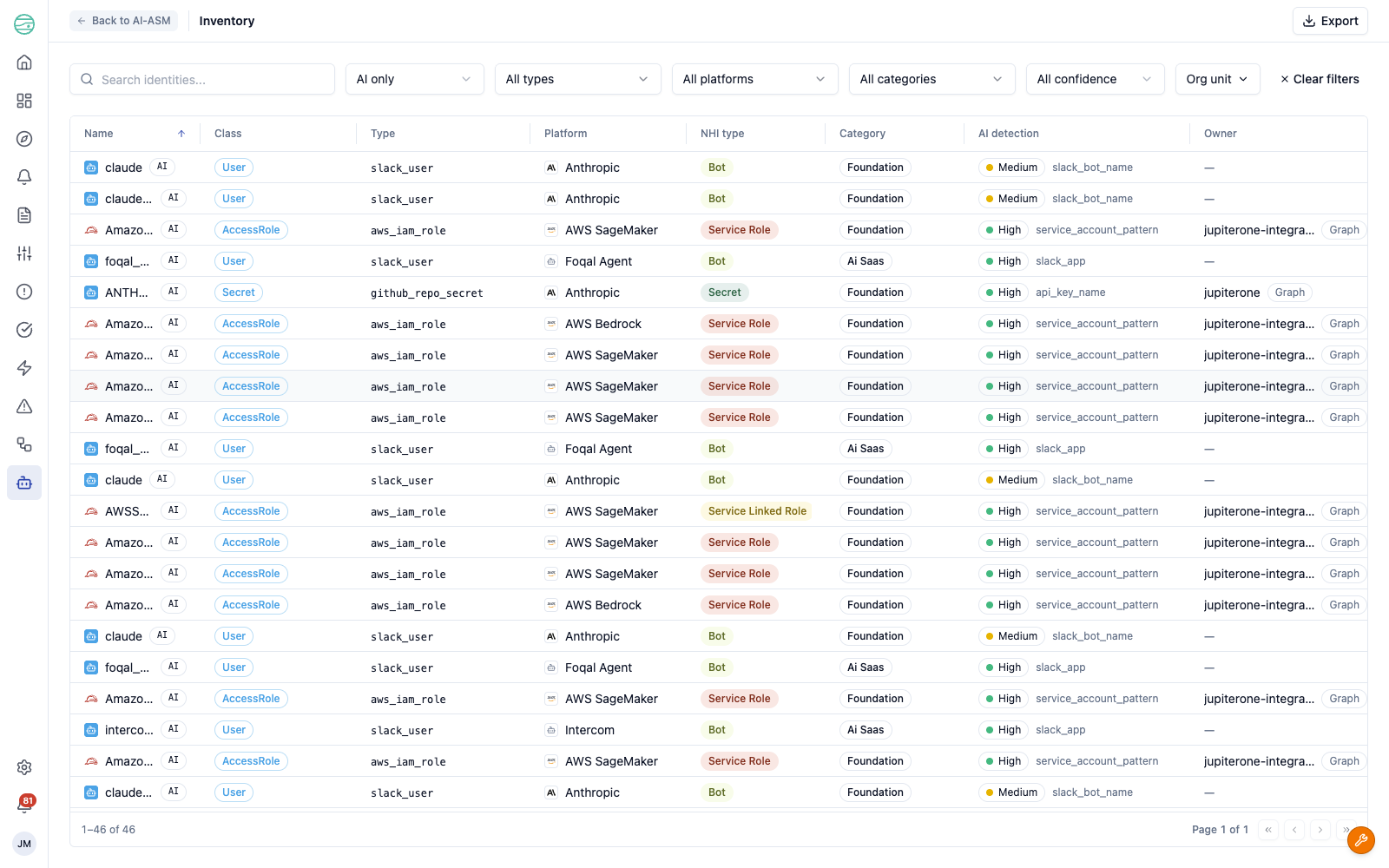
The Inventory view lists every non-human identity in your environment in a single sortable, filterable table. Use the AI only / Non-AI only filter to switch between your full NHI inventory and just the AI identities, and filter further by type, platform, category, detection confidence, or organisational unit.
Each row shows:
| Column | Description |
|---|---|
| Name | The identity name, with an AI badge when the identity is AI-related |
| Class and Type | The graph class and entity type (for example aws_iam_role, github_repo_secret, slack_user) |
| Platform | The AI platform the identity belongs to, where known |
| NHI type | The identity category (bot, service account, secret, role types, and so on) |
| Category | The kind of AI usage, such as Foundation or AI SaaS |
| AI detection | The detection confidence and the method that matched |
| Owner | The human or team accountable for the identity |
| Data reach | A link into the graph and a count of reachable assets |
| Status | The identity's current status |
| Failing controls | The number of failing controls for the identity |
Use Export to download the current view, respecting your active filters.
Inspecting an identity
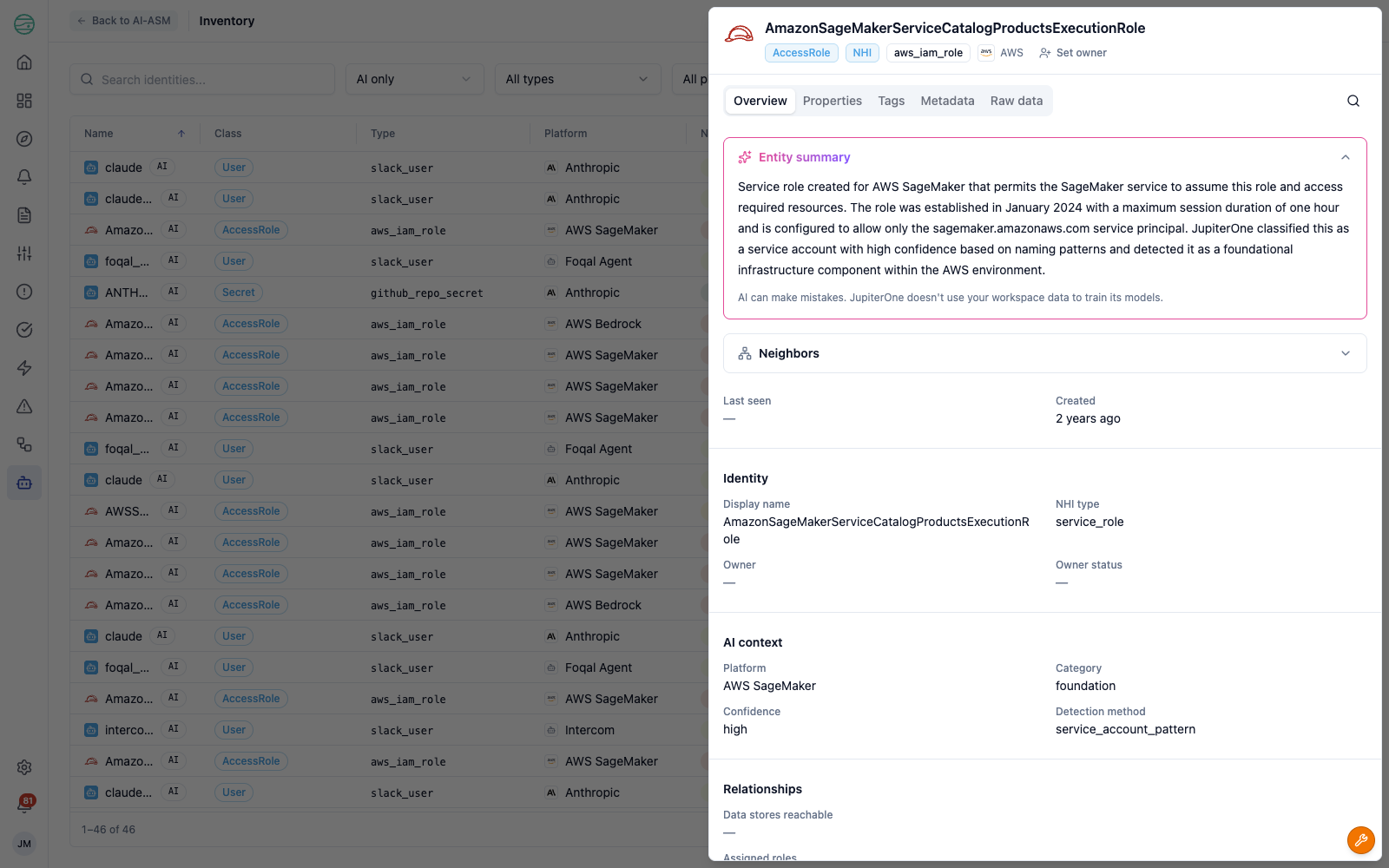
Select any identity to open its detail panel. The panel includes an AI-generated summary of the identity, its AI context (platform, detection confidence, and detection method), when it was first and last seen, its neighbours in the graph, and its relationships — so you can understand what an identity is, why it was classified as AI, and what it connects to without leaving the view.
Governing AI identities
AI-ASM ships with the AI Attack Surface Management (AI-ASM) — NHI Governance Framework, an out-of-the-box framework that applies the Continuous Control Monitoring model to your non-human and AI identities. Its controls cover common governance obligations, such as:
- Every NHI has an assigned owner — each identity must have a designated human owner accountable for its security posture and lifecycle
- Shadow AI identities are flagged — AI-powered identities provisioned outside approved channels are detected and surfaced
- AI-powered NHIs have a documented purpose — each AI identity must have a documented business justification and approved use case
- Access control policies cover NHIs — non-human identities must be included in access control governance alongside human identities
These controls map to recognised standards and regulations — including NIST AI RMF, the EU AI Act, NIS2, and DORA — so governing your AI identities contributes directly to your compliance posture. Because the controls run on the same engine as the rest of CCM, their results appear in the AI-ASM dashboard, the controls views, and your framework compliance scores.
Getting started
- Connect the integrations that hold your identities — cloud platforms, SaaS applications, and source control — so JupiterOne can discover your NHIs. AI-ASM uses the integrations you already have configured.
- Navigate to AI-ASM > Dashboard to see your AI attack surface, the frameworks it affects, and your highest-risk identities.
- Open AI-ASM > Inventory and filter to AI only to review the AI identities in your environment, their detection confidence, and what they can reach.
- Assign owners to unowned identities and review the Control status section to address failing governance controls.