AI-ASM 1.0 Release Notes
Release date: June 2026
AI Attack Surface Management (AI-ASM) 1.0 gives you a single, governed view of the non-human identities (NHIs) in your environment and the AI usage hiding among them. As teams adopt AI assistants, agents, and platform services, machine identities — service accounts, API keys, OAuth apps, bots, and roles — multiply far faster than the human identities security teams traditionally track, and many of them are AI-powered. AI-ASM discovers those identities through the integrations you already have, automatically flags the AI-related ones, shows what each can reach, ranks them by risk, and governs them against an out-of-the-box framework mapped to AI and security regulations.
What is new in AI-ASM 1.0
| Feature | What it means for you |
|---|---|
| Non-human identity discovery | Every NHI across your cloud, SaaS, and source-control integrations is brought into the graph automatically — no manual inventory |
| Automatic AI identity detection | NHIs associated with AI agents, models, and platforms are flagged, each with a confidence level and the detection method that matched |
| AI-ASM dashboard | A single landing view summarising your AI attack surface — AI identities, frameworks at risk, failing controls, platforms, and NHI types |
| Top risk AI identities | AI identities ranked by what they can reach, so the highest-impact identities surface first |
| Data reachability | See the data stores, repositories, databases, packages, vaults, tables, and disks each identity can reach |
| AI inventory | A filterable inventory of every NHI, with an AI-only view, detection confidence, ownership, and per-identity reach |
| NHI governance framework | An out-of-the-box framework that governs AI and non-human identities against standards including NIST AI RMF, the EU AI Act, NIS2, and DORA |
Non-human identity discovery
AI-ASM brings the non-human identities in your environment into the JupiterOne graph using the integrations you already have configured. A non-human identity (NHI) is any digital identity that is not a person — a service account, machine credential, secret, OAuth app, bot, certificate, API key, webhook, or CI/CD identity.
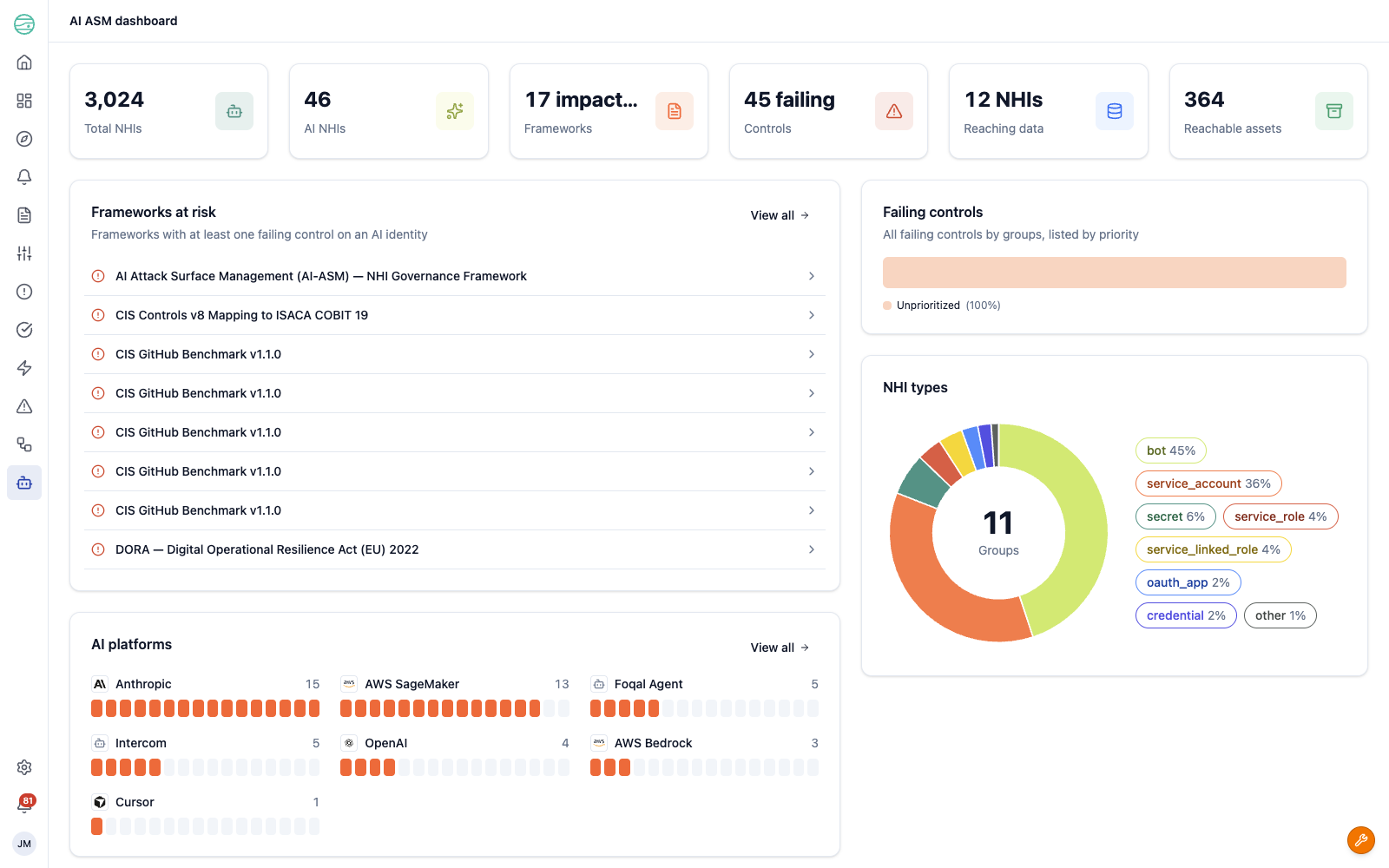
Because NHIs are first-class graph entities, they participate in queries, controls, and relationships like any other asset. The dashboard summarises the full population at the top of the page, alongside the AI subset:
- Total NHIs — every non-human identity discovered in your environment
- AI NHIs — the subset classified as AI-related
- Reaching data and Reachable assets — how many identities can reach data, and how many assets they can reach in total
Automatic AI identity detection
AI-ASM evaluates every discovered NHI against a set of detection heuristics and records the result on the identity, so you can see not just that an identity is AI-related but why.
Each AI identity carries:
- A confidence level —
confirmedwhen there is signed evidence, orhigh,medium, orlowfor heuristic matches - A detection method — the signal that matched, such as a Slack bot or app name, an API key named for an AI provider, an AI platform service-account or role pattern, or a display-name pattern
- A platform — the AI vendor or platform the identity belongs to, such as Anthropic, OpenAI, AWS Bedrock, or AWS SageMaker
- A category — the kind of AI usage, such as a Foundation model provider or an AI SaaS application
The AI platforms and NHI types panels on the dashboard break your AI identities down by platform and by identity category, so you can see at a glance where your AI usage is concentrated.
Risk-ranked dashboard
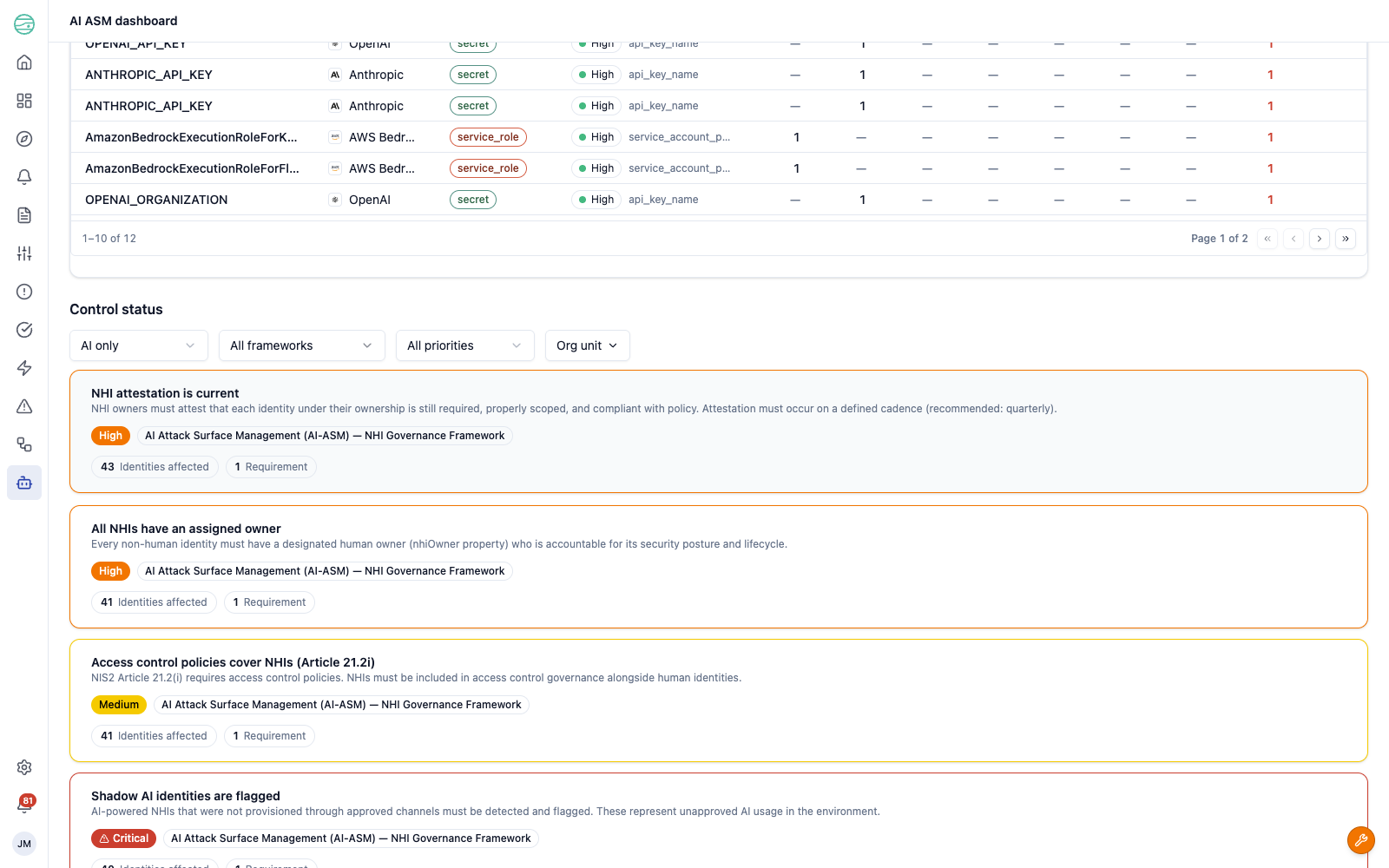
The Top risk AI identities table ranks your AI identities by what they can reach. Each row shows the identity, its platform, NHI type, and detection confidence and method, followed by a breakdown of reachable assets — Stores, Repos, DBs, Pkgs, Vaults, Tables, and Disks — and a Total reach count. Identities with the broadest reach surface first, so you can focus on the ones that would cause the most damage if compromised.
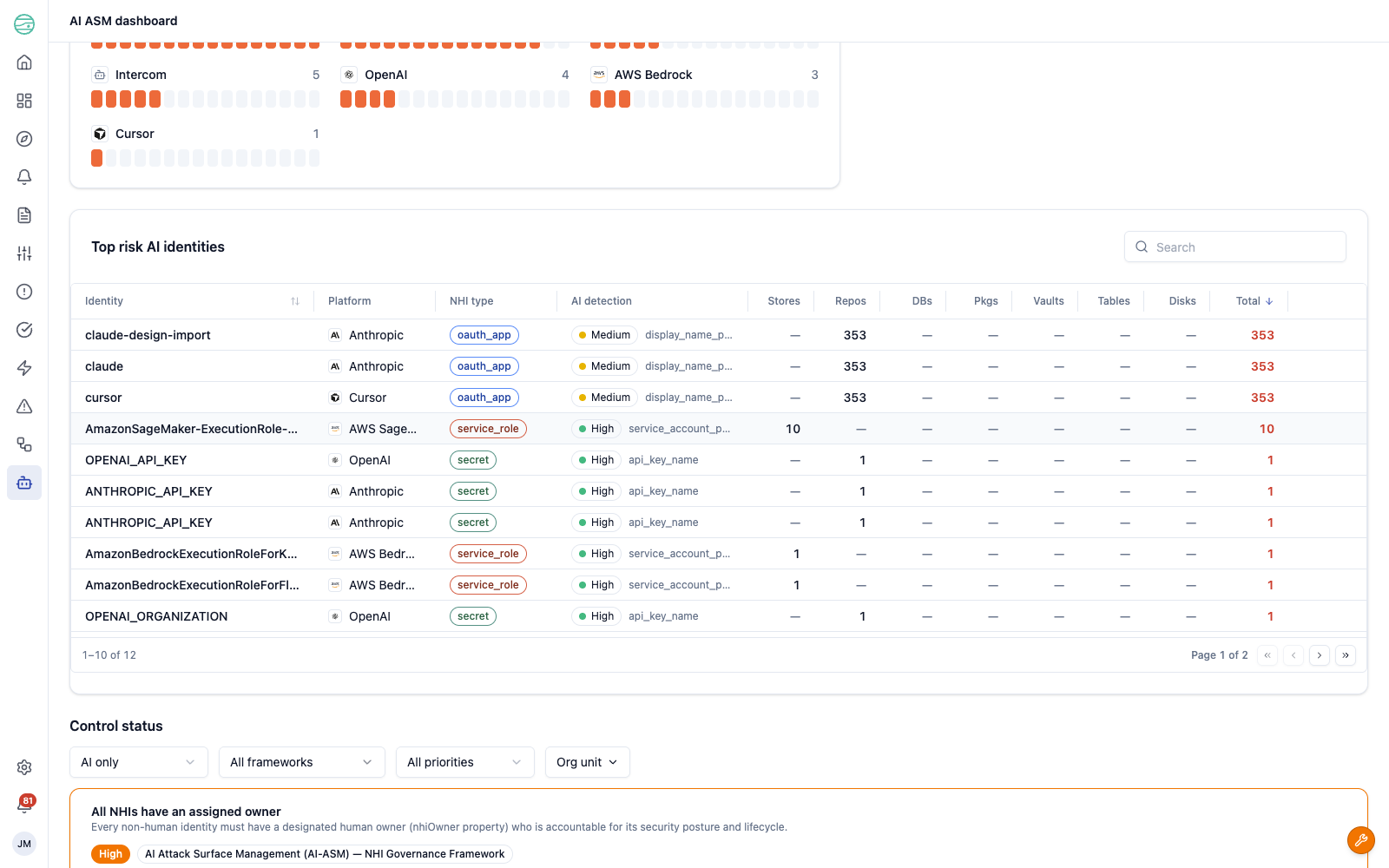
Use the reach breakdown to triage. An AI identity that can reach hundreds of repositories or data stores is a far higher priority than one with no reach, even when both have failing controls.
AI inventory
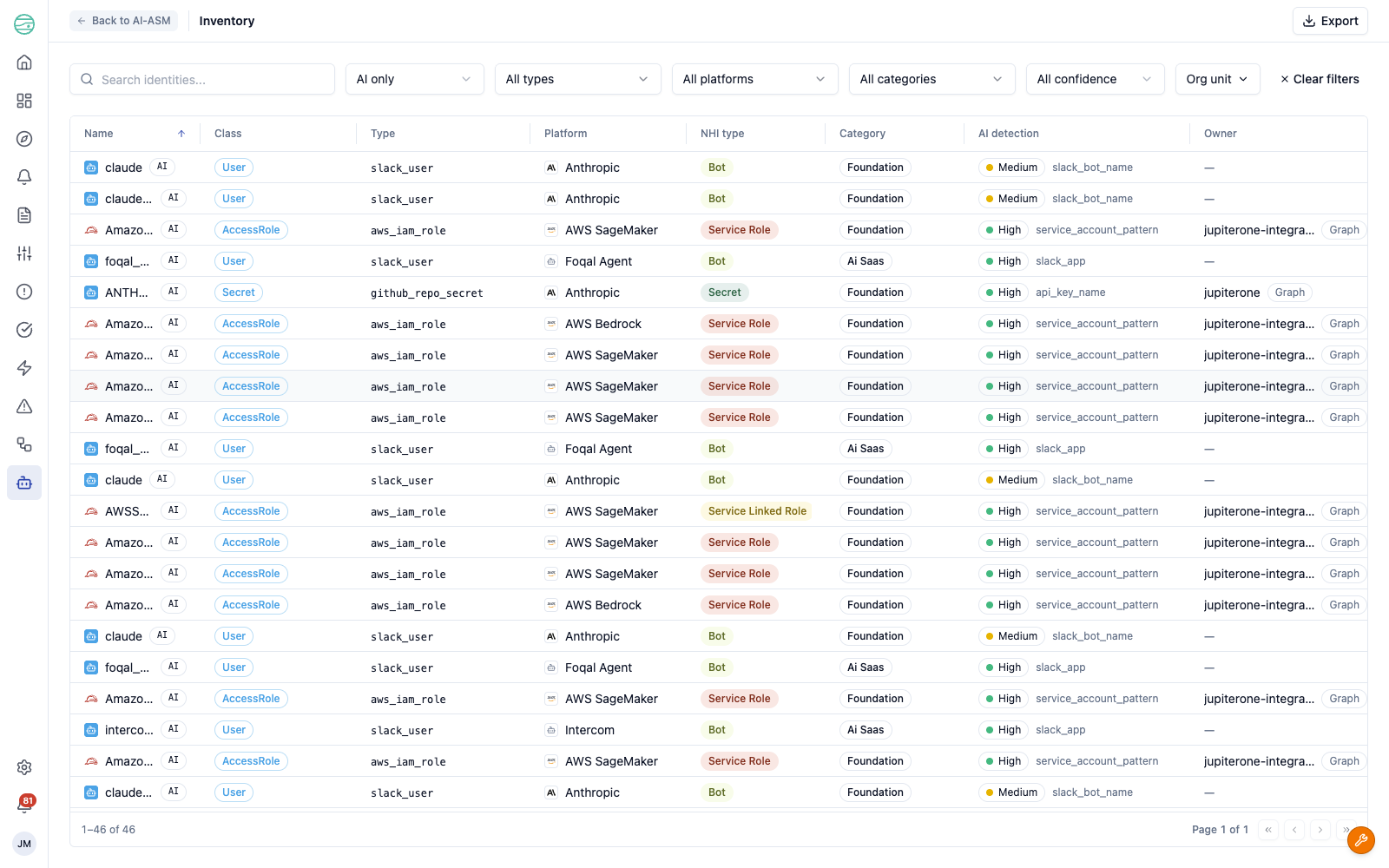
The Inventory view lists every non-human identity in a single sortable, filterable table. Switch between your full NHI population and just the AI identities with the AI only / Non-AI only filter, and narrow further by type, platform, category, detection confidence, or organisational unit.
Each identity shows its class and type, platform, NHI type, category, AI detection confidence and method, owner, data reach, status, and the number of failing controls against it. AI identities are marked with an AI badge. Use Export to download the current view, respecting your active filters.
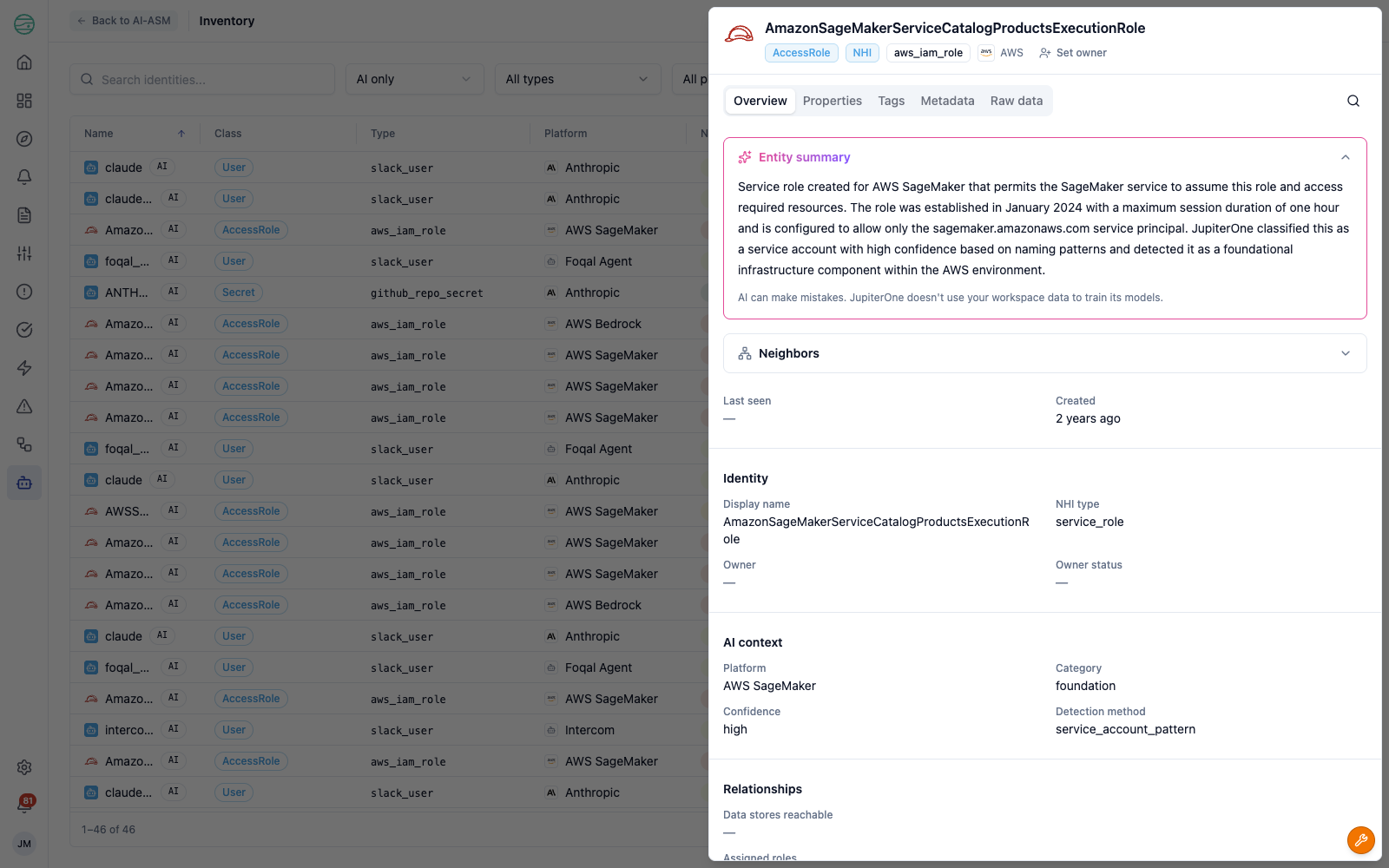
Select any identity to open its detail panel, which includes an AI-generated summary of the identity, its AI context (platform, detection confidence, and detection method), when it was first and last seen, and its neighbours and relationships in the graph.
NHI governance framework
AI-ASM 1.0 ships with the AI Attack Surface Management (AI-ASM) — NHI Governance Framework, an out-of-the-box framework that applies the Continuous Control Monitoring model to your non-human and AI identities. Its controls cover common governance obligations, including:
- Every NHI has an assigned owner — each identity must have a designated human owner accountable for its security posture and lifecycle
- Shadow AI identities are flagged — AI-powered identities provisioned outside approved channels are detected and surfaced
- AI-powered NHIs have a documented purpose — each AI identity must have a documented business justification and approved use case
- Access control policies cover NHIs — non-human identities are included in access control governance alongside human identities
The controls map to recognised standards and regulations — including NIST AI RMF, the EU AI Act, NIS2, and DORA — so governing your AI identities contributes directly to your compliance posture. Because they run on the same engine as the rest of CCM, their results appear in the AI-ASM dashboard, the controls views, and your framework compliance scores.
The dashboard's Control status section brings these controls together. Filter by AI only, framework, priority, or organisational unit; each control card shows the control description, its priority, the framework it belongs to, how many identities it affects, and the requirements it maps to.
Getting started
If you already use JupiterOne integrations: AI-ASM works with the integrations you have configured — no new setup is required to start discovering identities.
- Navigate to AI-ASM > Dashboard to see your AI attack surface, the frameworks it affects, and your highest-risk identities.
- Open AI-ASM > Inventory and filter to AI only to review the AI identities in your environment, their detection confidence, and what they can reach.
- Assign owners to unowned identities, and use the Control status section to address failing governance controls.
If you are new to JupiterOne: Connect the integrations that hold your identities — cloud platforms, SaaS applications, and source control — so JupiterOne can discover your NHIs. The AI-ASM dashboard and inventory populate automatically as identities are ingested.
For full feature documentation, see AI Attack Surface Management.