Organizational Units
Organizational units (OUs) scope your JupiterOne data to the teams that own it. An OU groups the assets, controls, and findings that belong to a single part of your organization so that each team can see its own posture without asking a central team to build a report. OUs are used as a filter in both Compliance (Continuous Control Monitoring) and Vulnerability Management, and are configured once from a single admin interface.
Namespaces and organizational units
OUs are organized into namespaces. A namespace is a grouping dimension — a way of dividing your environment — and the OUs inside it are the individual buckets along that dimension.
JupiterOne provides one built-in namespace and lets you create as many custom namespaces as you need:
- Integration (built-in) — A system-managed namespace where every integration instance in your account is automatically an OU. This namespace is read only: you cannot edit or delete it or its queries. Its OUs follow the integration instance lifecycle — when you add an integration its OU appears, and when you remove an integration its OU is removed.
- Custom namespaces — Namespaces you define yourself, where OU membership is computed from J1QL queries. Use custom namespaces to group your environment by team, business unit, region, environment, tag, or any other dimension that matters to your organization.
A single entity can belong to OUs in more than one namespace at the same time. For example, an EC2 instance can be in the Production OU of an Environment namespace and the Platform OU of a Teams namespace simultaneously.
The organizational unit admin interface
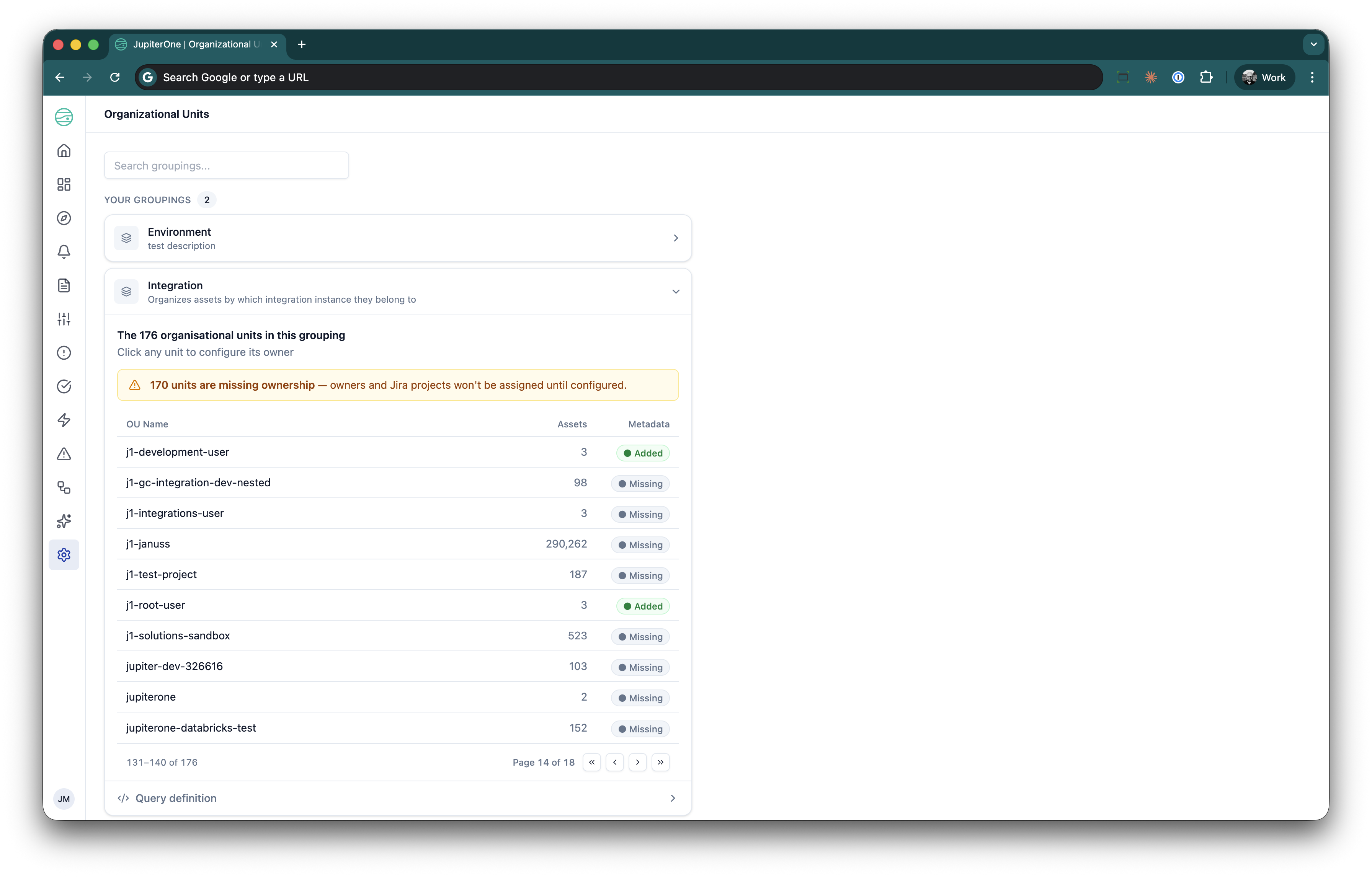
Configure namespaces and OUs from a single page. Navigate to Settings > Organizational Units to open the OU admin page.
The page lists every namespace as an expandable grouping. Expand a namespace to see the OUs it contains in a table with:
- OU name and integration icon — the name of the bucket, with the provider icon shown for integration-derived OUs.
- Assets — how many entities are scoped to this OU.
- Metadata — an Added or Missing badge indicating whether the OU has an owner configured. OUs without an owner are flagged Missing so you can see at a glance what still needs attention.
Create a custom namespace
- On the OU admin page, click New grouping. The admin interface refers to a namespace as a grouping and to an OU as a unit.
- Enter a Name (for example,
Teams) and an optional Description. - Optionally select a Default ticketing workflow — the Data Out ticketing instance pre-selected when someone creates a ticket for a vulnerability case whose asset doesn't belong to any OU. See Ticketing workflows and routing for how this setting is used and its prerequisites.
- Add one or more Queries that define how entities are bucketed into OUs.
- Click Save grouping.
Each query must RETURN exactly two aliased columns:
AS entityId— the matching entity.AS ouValue— the bucket key the entity is grouped by (a region, a tag, a team name). This value becomes the OU's label.
The bucket value must be populated on every matching entity. When you project an optional property such as a tag or a custom field, filter to entities that have it with WITH, otherwise the save fails with "must return at least one of ouValue or ouId".
Always project the bucket key AS ouValue. A second alias, AS ouId, is accepted only for keys that are UUIDs, but OUs created this way have no human-readable label and show as raw identifiers in the filter and admin interface. Use AS ouValue for every namespace query.
For example, to group AWS accounts by their Team tag:
FIND aws_account WITH tag.Team != undefined AS a
RETURN a._id AS entityId, a.tag.Team AS ouValue
A namespace can contain several queries — each one contributes its matched entities to the OUs in that namespace.
Start broad. A namespace that buckets every asset by a single tag or owner attribute you already maintain (for example, tag.Team or tag.Environment) gives every team a self-service view with almost no setup.
Configure OU routing metadata
Click any OU in the table to open its detail panel and configure routing metadata — who owns the OU and where its work is routed:
- Owner email (primary owner) — The primary person responsible for the OU. This is required for the OU to count as configured, and it receives the OU contact digest.
- Additional owner emails — Secondary owners, entered as a comma-separated list.
- Ticketing workflow — The Data Out ticketing instance used to create tickets for cases on this OU's assets. Until it is set, the Create ticket action is disabled for those cases. See Ticketing workflows and routing.
Changes persist immediately and are available through the API.
Set a primary owner email on every OU. The owner email clears the Missing badge, drives the OU contact digest, and identifies who to route a finding or control failure to when it belongs to that team.
Ticketing workflows and routing
OUs can carry a ticketing destination so that a case raised against a team's assets is filed in that team's ticketing system. There are two settings:
| Setting | Where to set it | What it does |
|---|---|---|
| Ticketing workflow | OU detail panel (click an OU) | The destination for tickets on cases whose asset belongs to this OU. |
| Default ticketing workflow | New grouping / Edit grouping dialog | The fallback destination for tickets on cases whose asset doesn't belong to any OU in the namespace. |
What a ticketing workflow is
The options in both dropdowns are Data Out instances (Data Out uses instance and workflow interchangeably). Each instance is a named delivery target that pairs a ticketing connection with a destination, such as a Jira project and issue type. JupiterOne runs each instance as a managed automation recipe behind the scenes, but you create and manage instances only from Integrations > Data out.
- Only instances for ticketing providers (Jira and ServiceNow) are listed. Instances for other Data Out providers are not.
- Recipes you build yourself in Automations are not Data Out instances and never appear in these dropdowns.
- If no ticketing instances exist, the dropdown is disabled and shows a Manage connections link.
Configure ticket routing
- Connect a ticketing provider. Go to Integrations > Data out > Connections and authorize Jira or ServiceNow. See Configure a Jira connection.
- Create one or more instances. Go to Integrations > Data out > Instances and click + Add instance on the provider section. A common pattern is one instance per team's project. See Create an instance. You can also reach this page from the New workflow link under any ticketing workflow dropdown in the OU admin page.
- Assign a workflow to each OU. On the OU admin page, click an OU, select its Ticketing workflow, set the Owner email, and click Save. The owner email pre-fills the ticket assignee for Jira instances.
- Set a default for unassigned work. Edit the grouping and select a Default ticketing workflow, for example a central security triage project.
- Point Vulnerability Management at the namespace. In Vulnerability Management, open Risk configuration and, under Cases — Ownership assignment, set the OU namespace to the namespace you configured. Vulnerability Management uses the built-in Integration namespace until you change this.
How a destination is chosen
When you open a vulnerability remediation case and click Create ticket, JupiterOne picks the destination as follows:
- If the case's asset belongs to an OU in the selected OU namespace, the OU's Ticketing workflow is used, and its Owner email pre-fills the assignee.
- If the asset doesn't belong to any OU, the namespace's Default ticketing workflow is used.
- If the applicable setting is empty, Create ticket is disabled with a message linking to OU settings.
The selected workflow is pre-filled in the Create ticket dialog, and you can still choose a different active instance before creating the ticket.
Limitations
- Tickets are created on demand. A ticketing workflow pre-selects the destination when someone clicks Create ticket. It does not file tickets automatically when a case is created.
- The default applies only to the Vulnerability Management OU namespace. A Default ticketing workflow on any other namespace is stored but not used today.
- An OU doesn't inherit the namespace default. If an OU has no Ticketing workflow of its own, Create ticket is disabled for its cases even when the namespace has a default. Set a workflow on every OU that should receive tickets.
- Only the first workflow is used. An OU holds a single ticketing workflow.
Troubleshooting
| Symptom | Cause and fix |
|---|---|
| The dropdown is disabled with No ticketing workflows are available | No Jira or ServiceNow instance exists. Connect a provider and create an instance under Integrations > Data out. |
| A recipe I built in Automations is missing from the dropdown | Only Data Out instances are listed. Recreate the destination with + Add instance under Integrations > Data out > Instances. |
| The dropdown shows Workflow no longer available (…) | The selected instance was deleted. Select a different workflow and save. |
| The Create ticket dialog doesn't pre-select the configured workflow | The Create ticket dialog only offers active instances, while the OU dropdowns list instances in any status. Resume the instance from Integrations > Data out > Instances, or fix its error. |
| Create ticket is disabled with No destination configured for the … OU | The OU has no Ticketing workflow. Set one in the OU detail panel. |
| Create ticket is disabled with No default destination configured for unassigned work | The OU namespace selected in Risk configuration has no Default ticketing workflow. Edit that grouping and set one. |
Filtering by organizational unit
Once your namespaces and OUs exist, you can filter by OU in both Compliance and Vulnerability Management. The OU filter narrows every view to the assets, controls, and findings that belong to the selected team.
In Compliance (Continuous Control Monitoring)
The Controls Status View and its drill-down can be scoped to one or more OUs.
- Open the Org Units filter at the top of the Controls Status View.
- Select one or more OUs, organized by namespace.
- The controls list filters to show only the controls with results related to assets in the selected OUs.
- The summary header adapts to show OU-specific compliance metrics, and the drill-down shows which assets within the selected OUs are affected, with individual pass and fail status.
The OU selection persists in the URL, so you can share a link to a specific OU's compliance view with a team member.
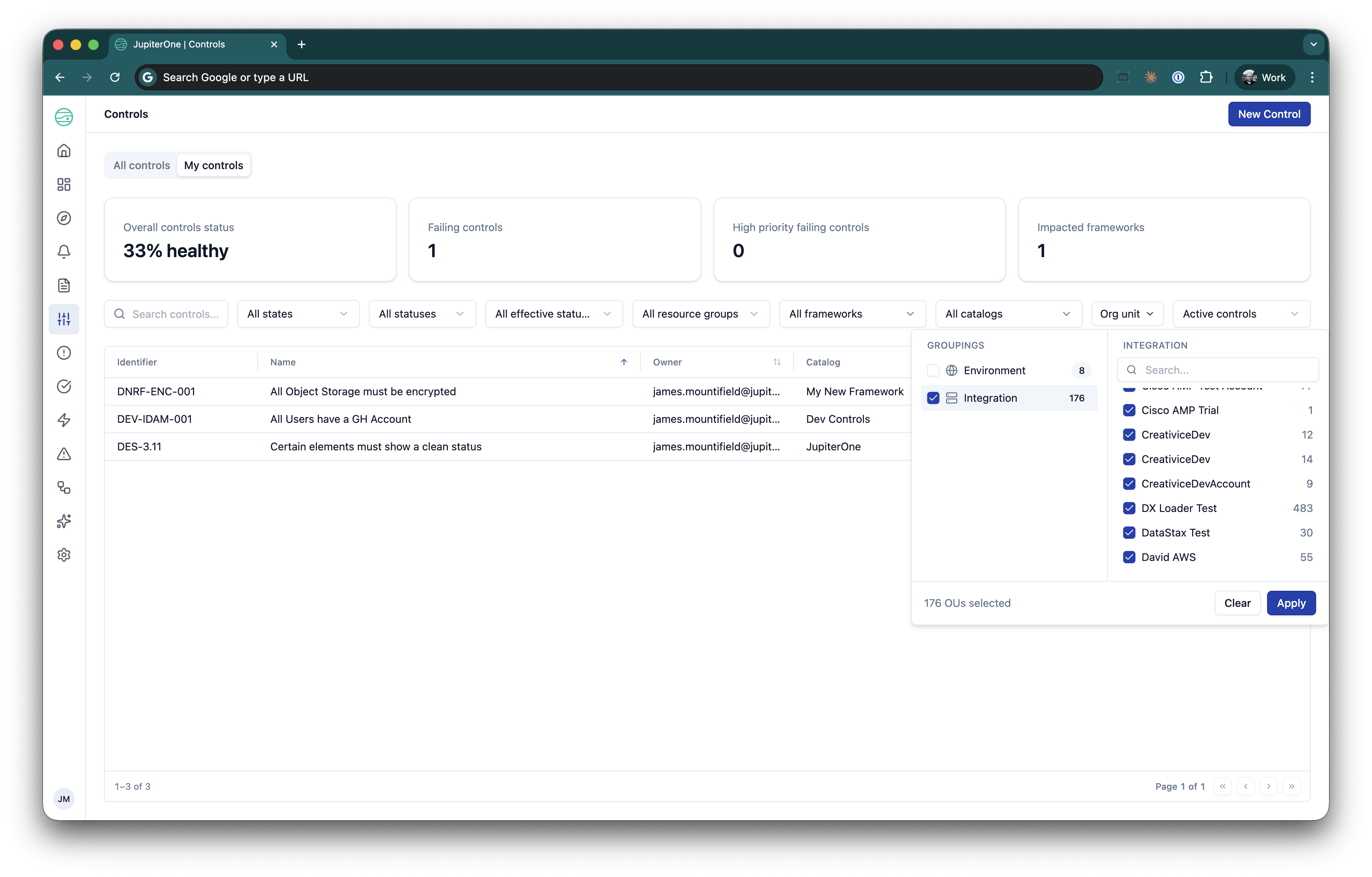
Give each team lead a self-service compliance view. An IT or Cloud Ops leader can select their OU and immediately see their team's compliance posture without asking the central compliance team for a report.
In Vulnerability Management
In Vulnerability Management, the OU identifies which team owns an affected asset and drives where remediation work is routed.
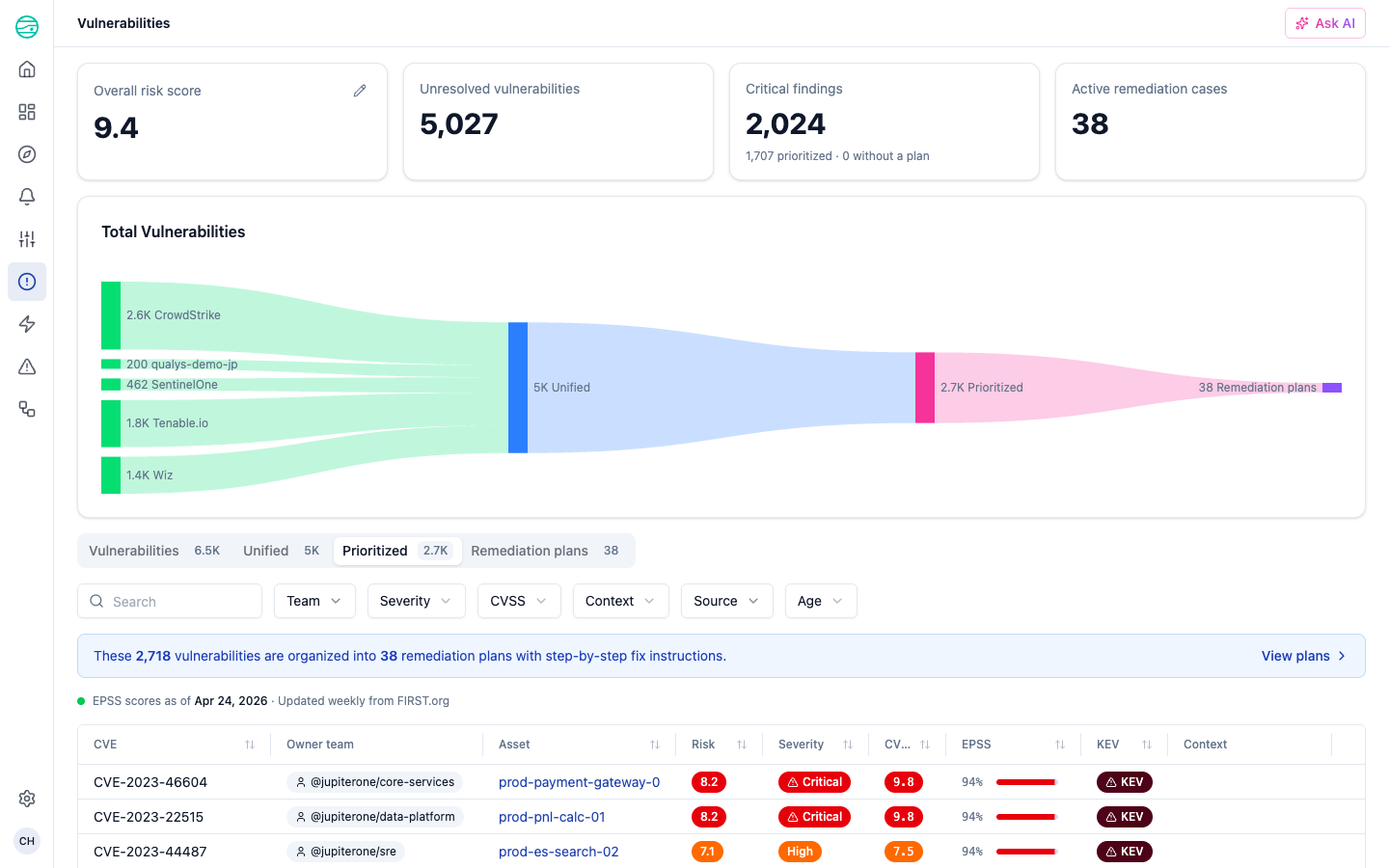
- The Owner team column shows the OU that owns the affected asset on the Prioritized view and on remediation plans.
- Filtering by OU narrows the vulnerability funnel to the findings on assets owned by that team.
- When you create a remediation plan, the OU determines which team the resulting case is routed to.
Vulnerability Management draws owner teams from a single configurable namespace, set as the OU namespace in the Risk configuration panel. It defaults to the built-in Integration namespace, so change it to a custom namespace — such as a team or business-unit grouping — when you want cases routed by that dimension instead.
Organizational unit metadata on entities
OUs are represented on the graph through internal metadata, which is what makes OU filtering and scoping possible. All internal metadata uses an underscore (_) prefix.
Every entity carries an _ou property: a pipe-delimited set of <namespace-slug>:<value> tokens for every OU the entity belongs to, across all namespaces. For example, an entity might carry |integration:8f3c…|teams:platform|environment:production|. The built-in Integration namespace populates these tokens automatically; custom namespaces populate them by evaluating their queries.
| Property | Type | Description |
|---|---|---|
_ou | string | The set of OUs the entity belongs to, as pipe-delimited namespace:value tokens. This is what the OU filter matches on. |
_integrationInstanceId | string | Internal UUID of the integration instance the entity was ingested from. Backs the built-in Integration namespace. |
_integrationName | string | User-provided friendly name of the integration instance. Surfaced as the OU name in the Integration namespace. |
_integrationType | string | Type of the integration, typically the provider name (for example, aws, azure, okta). |
You can filter entities by OU in J1QL using the _ou property and the ~= contains operator. For example, to find every entity in the platform OU of the teams namespace:
FIND * WITH _ou ~= '|teams:platform|'
For the built-in Integration namespace, _ou tokens are assigned and maintained by JupiterOne and follow the integration instance an entity was ingested from. For custom namespaces, membership is recomputed from the namespace queries — edit the query to change which entities fall into which OU.
For the full list of internal metadata assigned to entities and relationships, see Entity and Relationship Metadata.