Apple Business Manager
JupiterOne's integration with Apple Business Manager collects data about MDM servers and managed devices, providing visibility into your organization's Apple device management infrastructure.
- Installation
- Data Model
- Types
- Release Notes
Installation
For this integration, you will need an Apple Business Manager account with administrative access and API access enabled. This integration uses JWT-based OAuth authentication with the Apple Business Manager API.
You will need to generate a server token and obtain the required credentials from Apple Business Manager. See the Apple Business Manager API documentation for more information.
Obtaining API Credentials
- Log in to Apple Business Manager
- Navigate to Settings > Preferences
- Under Server Tokens, create a new token with the required permissions
- Download the private key (.pem file)
- Note the following values:
- Client ID: Your organization's Apple Business Manager Client ID
- Key ID: The identifier for the private key
- Private Key: The content of the downloaded .pem file Once the API Token is created, you can find the Client ID and Key ID by clicking "Manage" next to the new token.
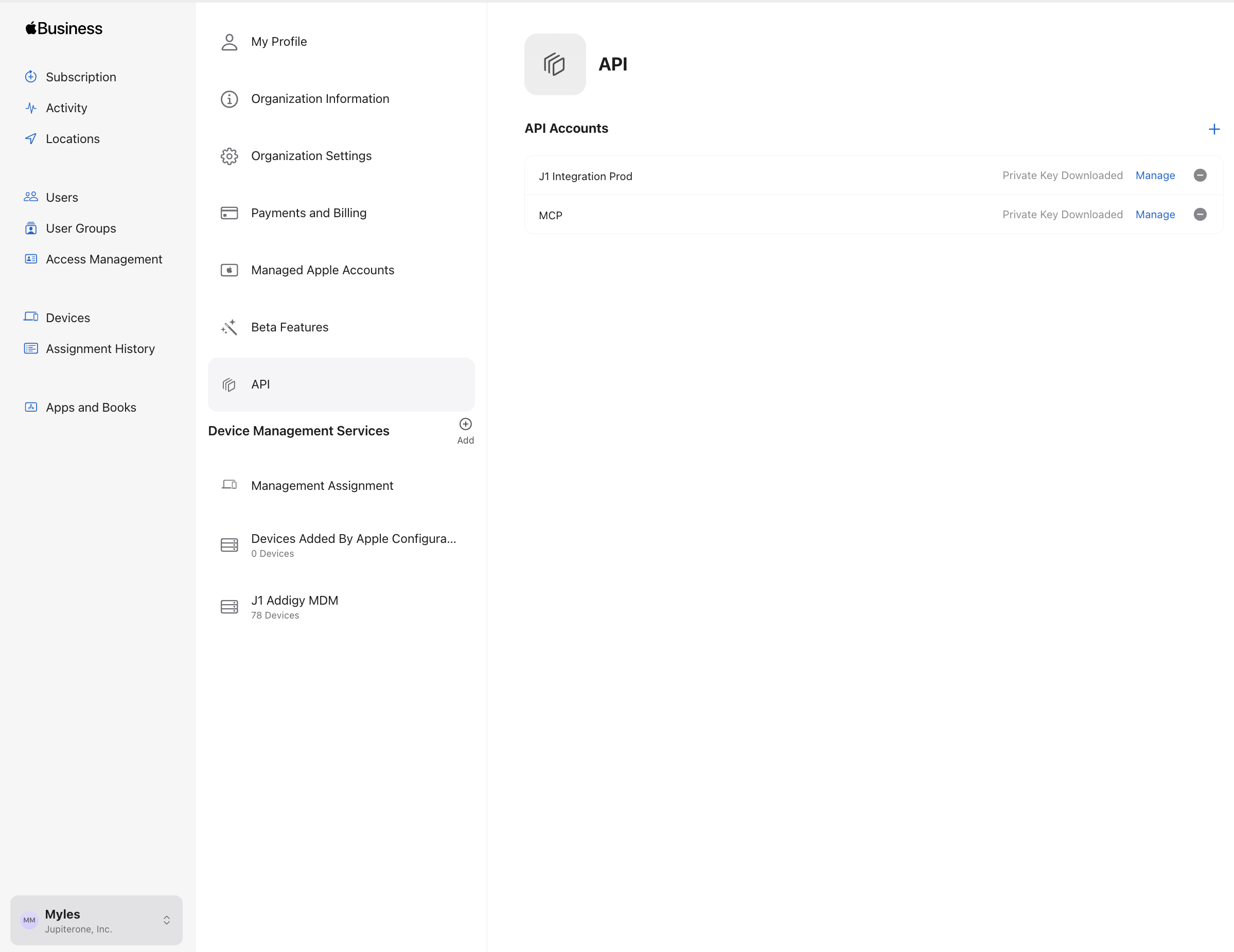
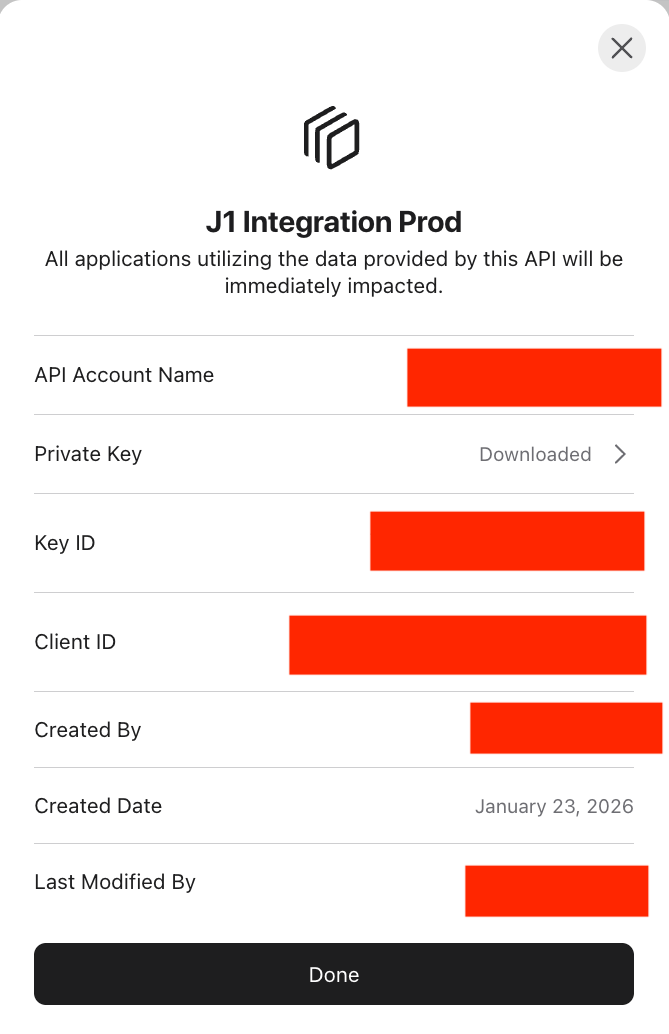
The server token you create must have sufficient permissions to access:
- MDM server configurations
- Device inventory
Configuration in JupiterOne
To install the Apple Business Manager integration in JupiterOne, navigate to the Integrations tab in JupiterOne and select Apple Business Manager. Click New Instance to begin configuring your integration.
Creating an instance requires the following:
-
The Account Name used to identify the Apple Business Manager account in JupiterOne. Ingested entities will have this value stored in
tag.AccountNamewhen theAccountNametoggle is enabled. -
Description to assist in identifying the integration instance, if desired.
-
Polling Interval that you feel is sufficient for your monitoring needs. You may leave this as
DISABLEDand manually execute the integration. -
Client ID: Your Apple Business Manager Client ID
-
Key ID: The Key ID associated with your private key
-
Private Key: Upload the .pem file you downloaded from Apple Business Manager
Click Create once all values are provided to finalize the integration.
If the integration runs successfully but no entities are collected, verify that your organization has MDM servers configured in Apple Business Manager and that devices are assigned to your organization.
Next steps
Now that your integration instance has been configured, it will begin running on the polling interval you provided, populating data within JupiterOne. Continue on to our Instance management guide to learn more about working with and editing integration instances.
Entities
The following entities are created:
| Resources | Entity _type | Entity _class |
|---|---|---|
| AppleCare Coverage | apple_business_manager_apple_care_coverage | Subscription |
| MDM Server | apple_business_manager_mdm_server | Service |
| Org Device | apple_business_manager_org_device | Device |
| Organization | apple_business_manager_organization | Account |
Relationships
The following relationships are created:
Source Entity _type | Relationship _class | Target Entity _type |
|---|---|---|
apple_business_manager_org_device | HAS | apple_business_manager_apple_care_coverage |
apple_business_manager_organization | HAS | apple_business_manager_mdm_server |
Apple Business Manager Apple Care Coverage
apple_business_manager_apple_care_coverage inherits from Subscription
| Property | Type | Description | Specifications |
|---|---|---|---|
agreementNumber | string | null | Apple-issued agreement number for the coverage contract. Null for base Limited Warranty. | |
contractCancelOn | number | null | Timestamp the contract was cancelled, if cancelled (ms since epoch). | |
endedOn | number | null | Coverage end timestamp (ms since epoch). | |
isCanceled | boolean | null | Whether the coverage contract has been cancelled. | |
isRenewable | boolean | null | Whether the coverage contract can be renewed at end of term. | |
paymentType | string | null | Payment type for the coverage contract. Known values: ABE_SUBSCRIPTION, PAID_UP_FRONT, SUBSCRIPTION, NONE. | |
startedOn | number | null | Coverage start timestamp (ms since epoch). |
Apple Business Manager Mdm Server
apple_business_manager_mdm_server inherits from Service
| Property | Type | Description | Specifications |
|---|---|---|---|
serverType | string | null |
Apple Business Manager Org Device
apple_business_manager_org_device inherits from Device
| Property | Type | Description | Specifications |
|---|---|---|---|
addedToOrgOn | number | ||
bluetoothMacAddress | string | null | ||
color | string | null | ||
deviceCapacity | string | null | ||
deviceFamily | string | null | ||
eid | string | null | ||
imei | array | null | ||
meid | array | null | ||
orderedOn | number | ||
orderNumber | string | ||
partNumber | string | ||
productType | string | null | ||
purchaseSourceId | string | ||
purchaseSourceType | string | ||
releasedFromOrgOn | number | null | ||
status | string | ||
wifiMacAddress | string | null |
Apple Business Manager Organization
apple_business_manager_organization inherits from Account
| Property | Type | Description | Specifications |
|---|---|---|---|
adminId | string | ||
orgAddress | string | ||
orgEmail | string | ||
orgId | string | ||
orgPhone | string | ||
orgType | string |
Release Notes
- 2026-01-20 — New Apple Business Manager integration: ingests organizations, MDM servers, and organization-owned devices.